95

ready-made documents — 41 policies, 44 registers and 10 general templates

3 report types

AI reports drafted from your own records — never a generic template

Unlimited

people records on every plan — the price never moves with headcount

Firms

a self-contained set of records for each team, branch or firm — one on Starter, three on Growth, unlimited on Pro

The route

Eight stops, in the order the work happens

Click a stop to jump straight to it, or just keep scrolling. After the last stop: firms and white label, getting started and common questions.

Stop one

Start where the work is

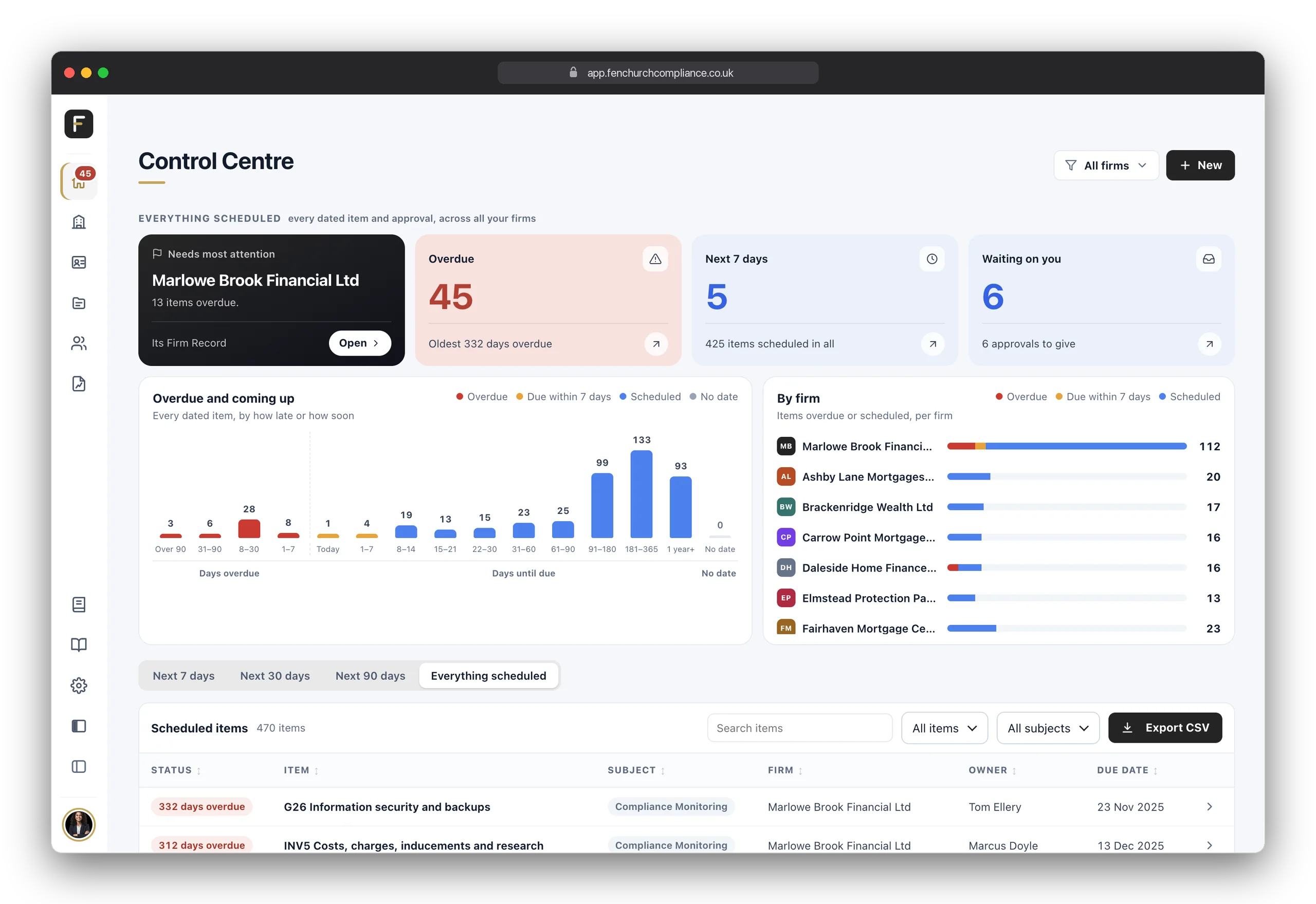
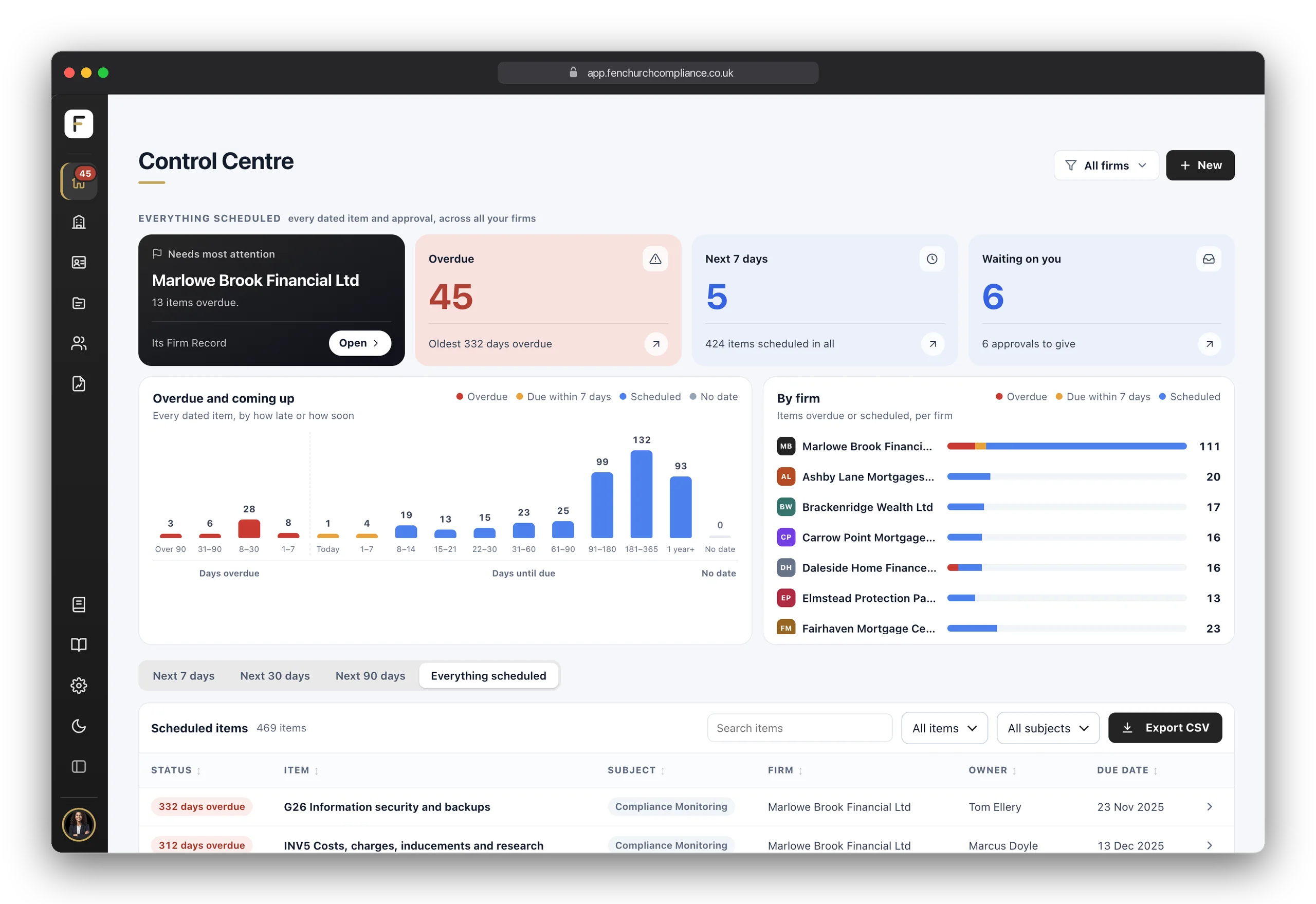
This is the screen you open in the morning. Four tiles at the top: the firm that needs most attention, what is overdue, what falls due in the next seven days, and what is waiting on your approval. Below them, a chart of everything by how late or how soon it is, a bar for each firm, and one list of everything with a date on it, across every firm you can reach. One firm, three branches or a network of Appointed Representatives: it's the same list, tagged by firm.

Open any row and it takes you to the record itself. Deal with it, and you're brought straight back to where you were. Narrow it to the next seven, thirty or ninety days, search it, sort any column, or export it. Nothing to hold in your head, and no spreadsheet of deadlines to keep alive on the side.

  • Four tiles, no noiseThe firm that needs most attention, overdue, the next seven days, and waiting on you.
  • Every kind of deadlineRegister entries, Annual Confirmations, monitoring checks, policy reviews, Fit & Proper reviews and oversight items, in one list, filtered by subject, firm or timeframe.
  • Straight to the record, and backOpen it, deal with it, return to exactly where you were.
  • Approvals underneathRecords sent to you to sign off sit in their own list on the same screen, so nothing waits in an inbox.

Stop two

Every firm, and its record

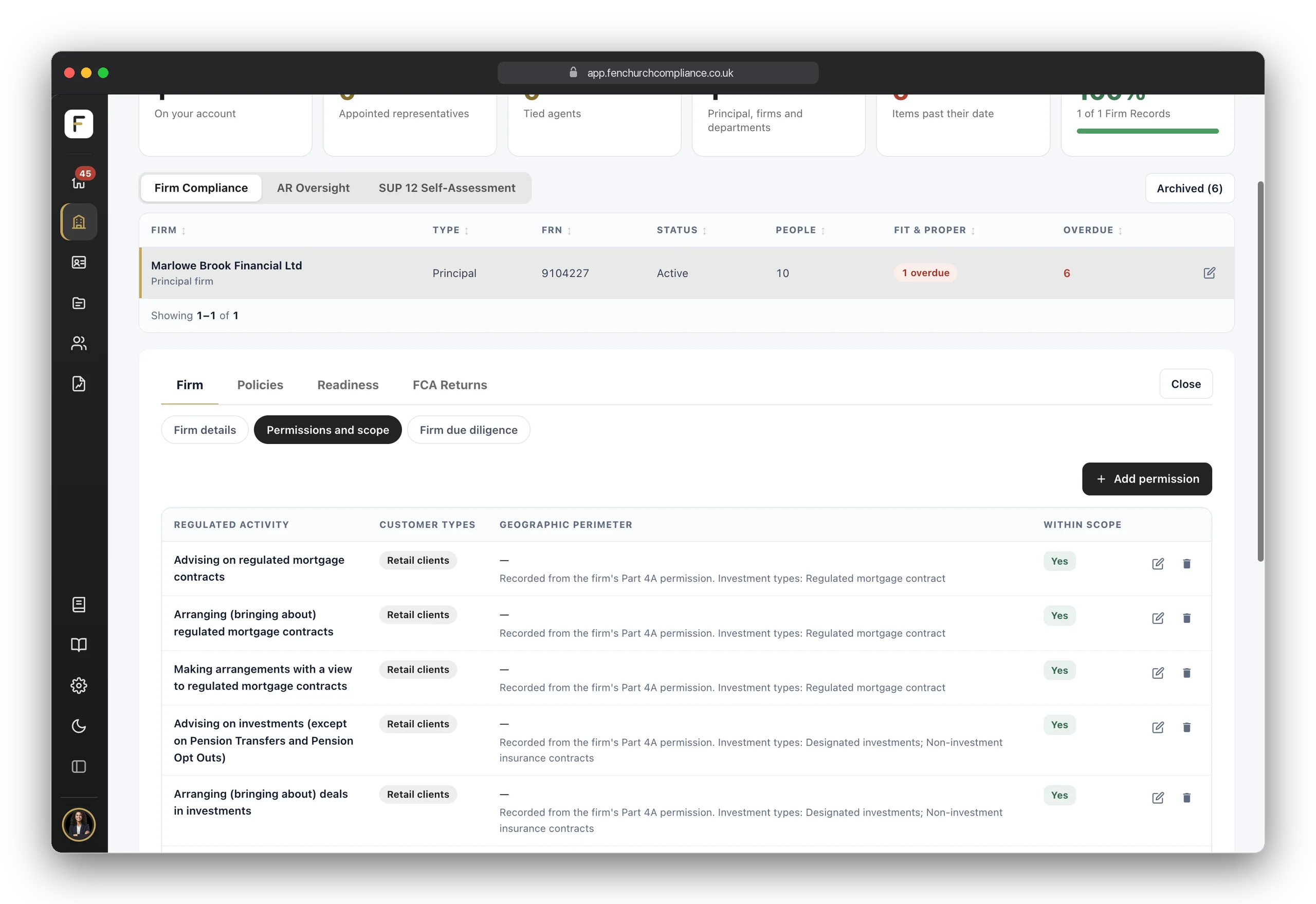
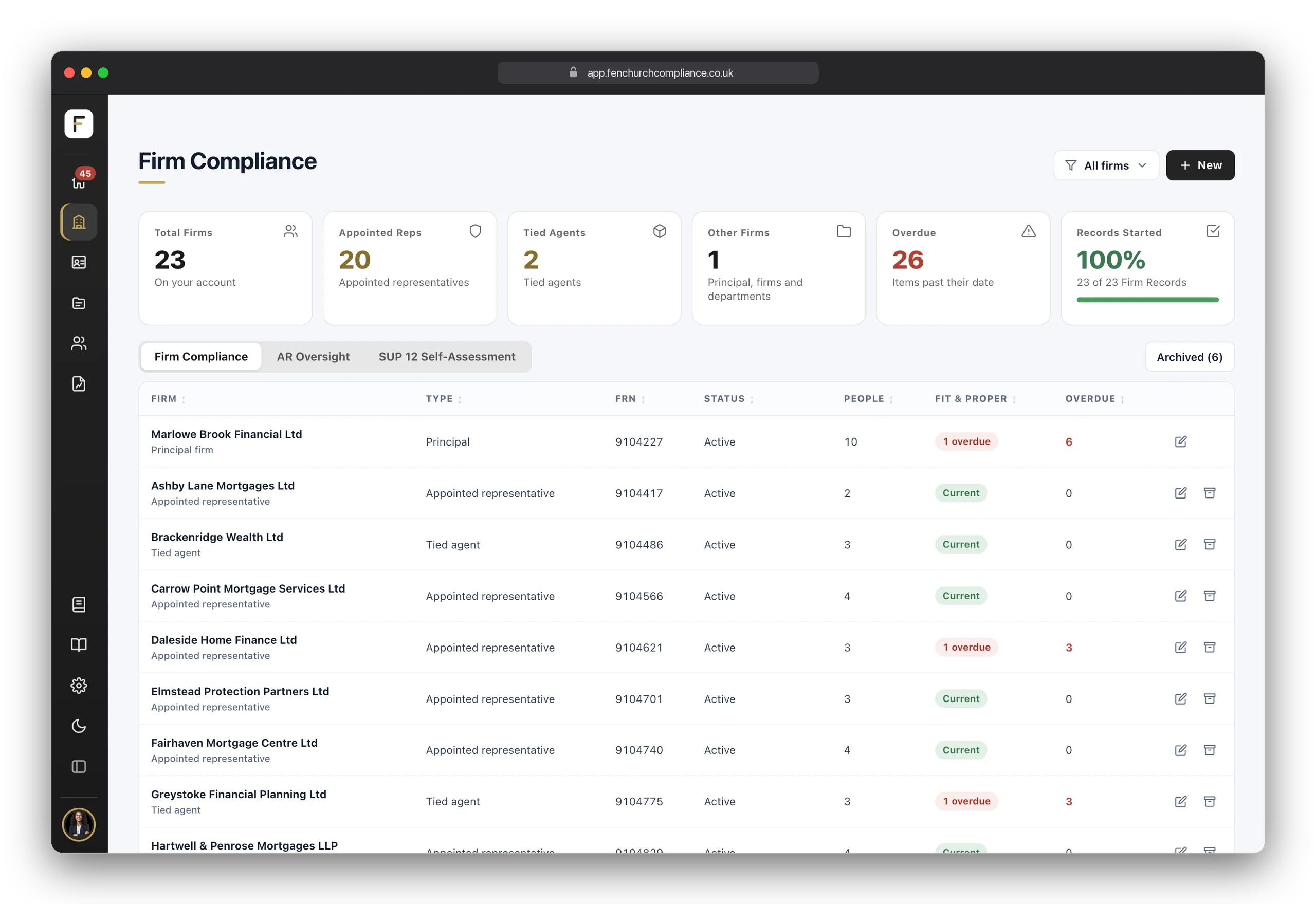
Firms, the second place in the sidebar, opens Firm Compliance: how many firms are on your account, what is overdue, and a table of every firm with its type, its FRN, its status, its people and where its Fit & Proper reviews stand. Most customers have one firm, their own; others keep one for each branch, entity or appointed representative.

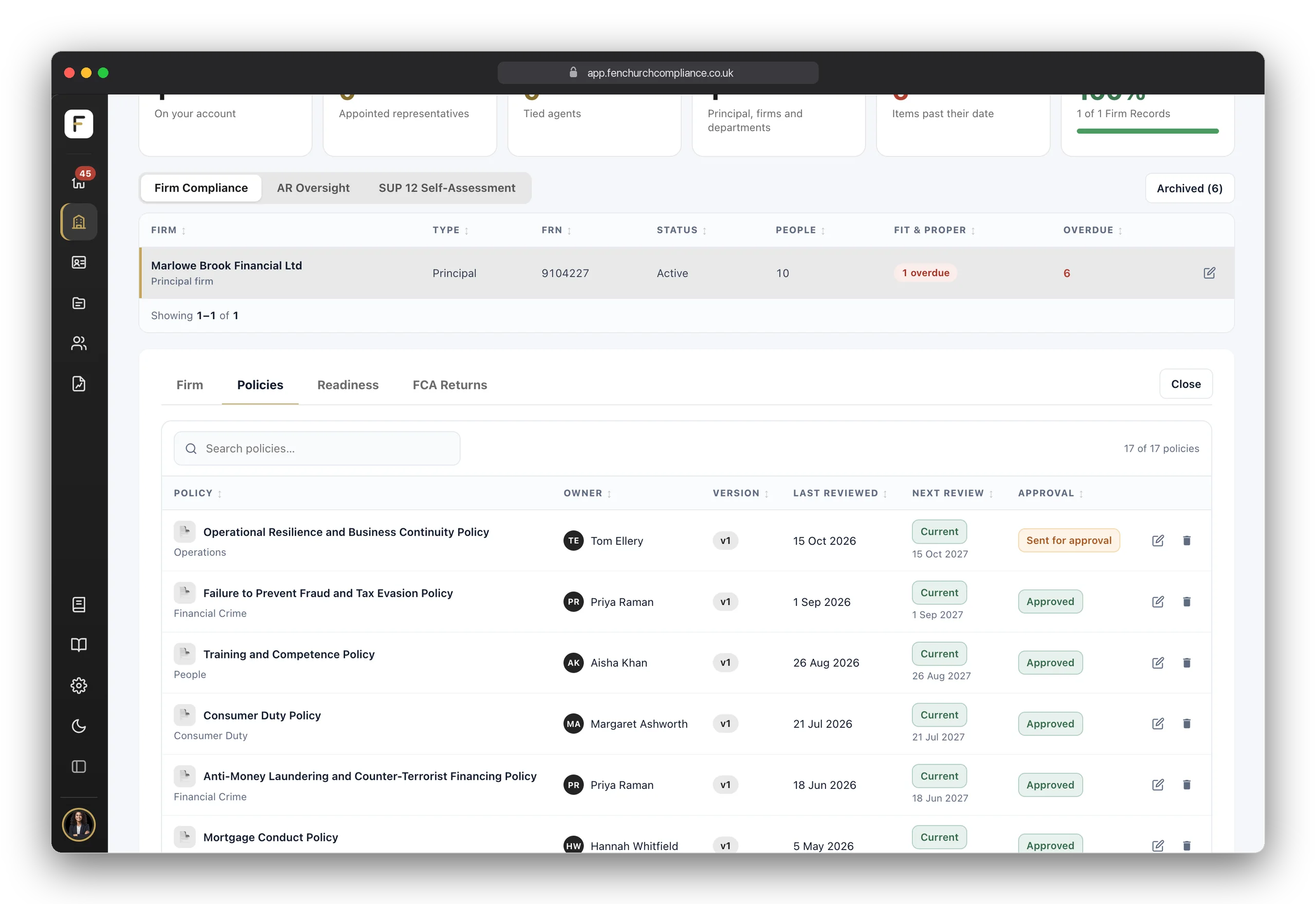
Click a firm and its record opens beneath the table: its details, the permissions it holds, read from the FCA's register, its due diligence, its policies, its readiness for an FCA visit and, for a directly authorised firm, its FCA returns. Every page then follows the firm filter at the top: one firm, several or all of them.

  • Every firm in one tableType, FRN, status, people, Fit & Proper and what is overdue, for every firm you can reach.
  • Permissions from the FCA registerEnter the FRN and the firm's details and Part 4A permissions are read from the FCA's Financial Services Register.
  • One filter, every pageChoose one firm, several or all, and every page, table and count follows it.
  • Start anything from + NewA firm, a person, a customer file, a policy, a monitoring check, a proof pack or a Live Link, from the same button on every page.

Stop three

Annual Confirmations that teach as they record

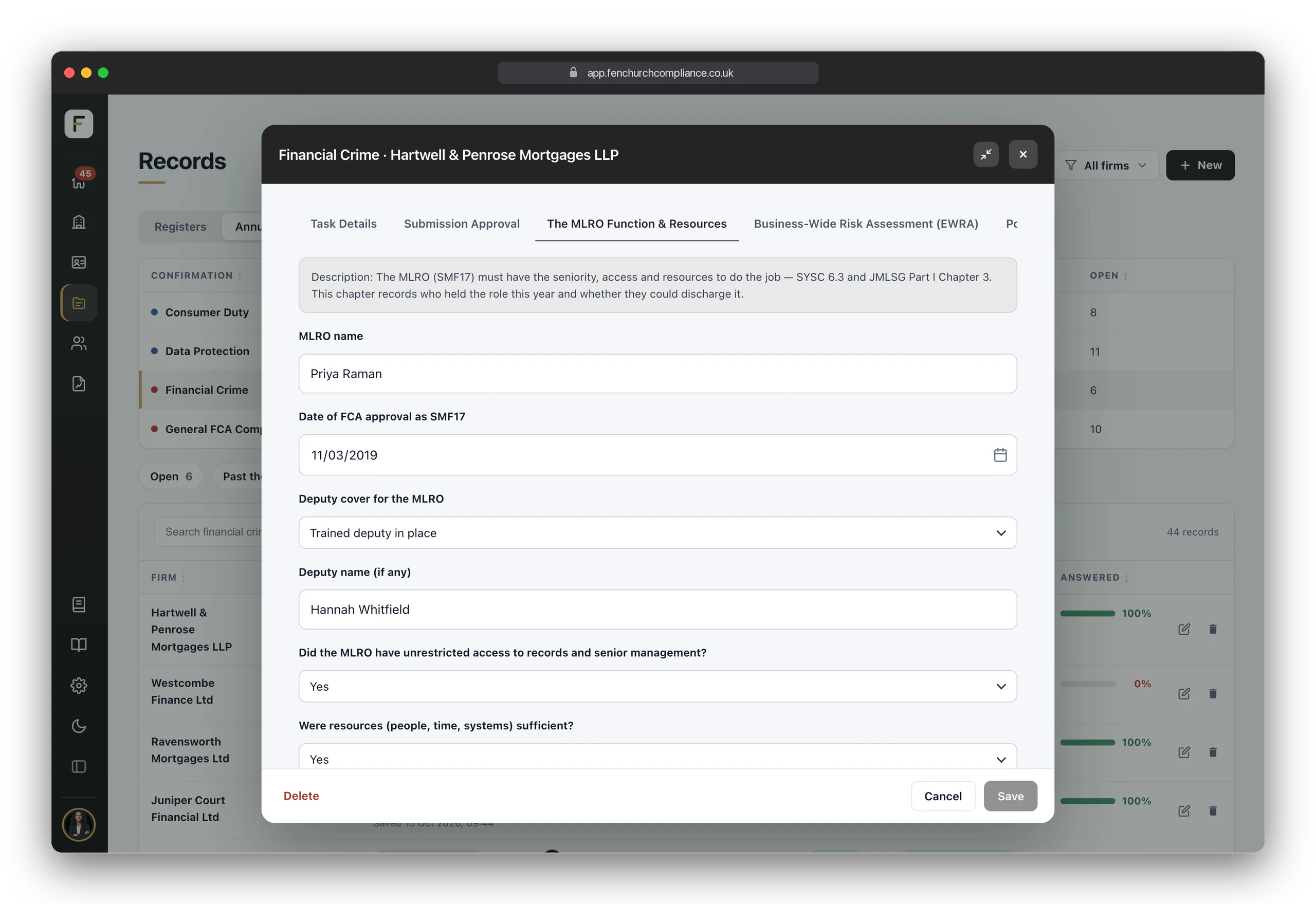
An Annual Confirmation is how a firm confirms, in writing and on a date, that it has done what a rule expects. Open one and each section starts by explaining the rule in plain English — what the FCA is looking for and why — before asking the questions. You learn the language as you go, rather than needing it up front.

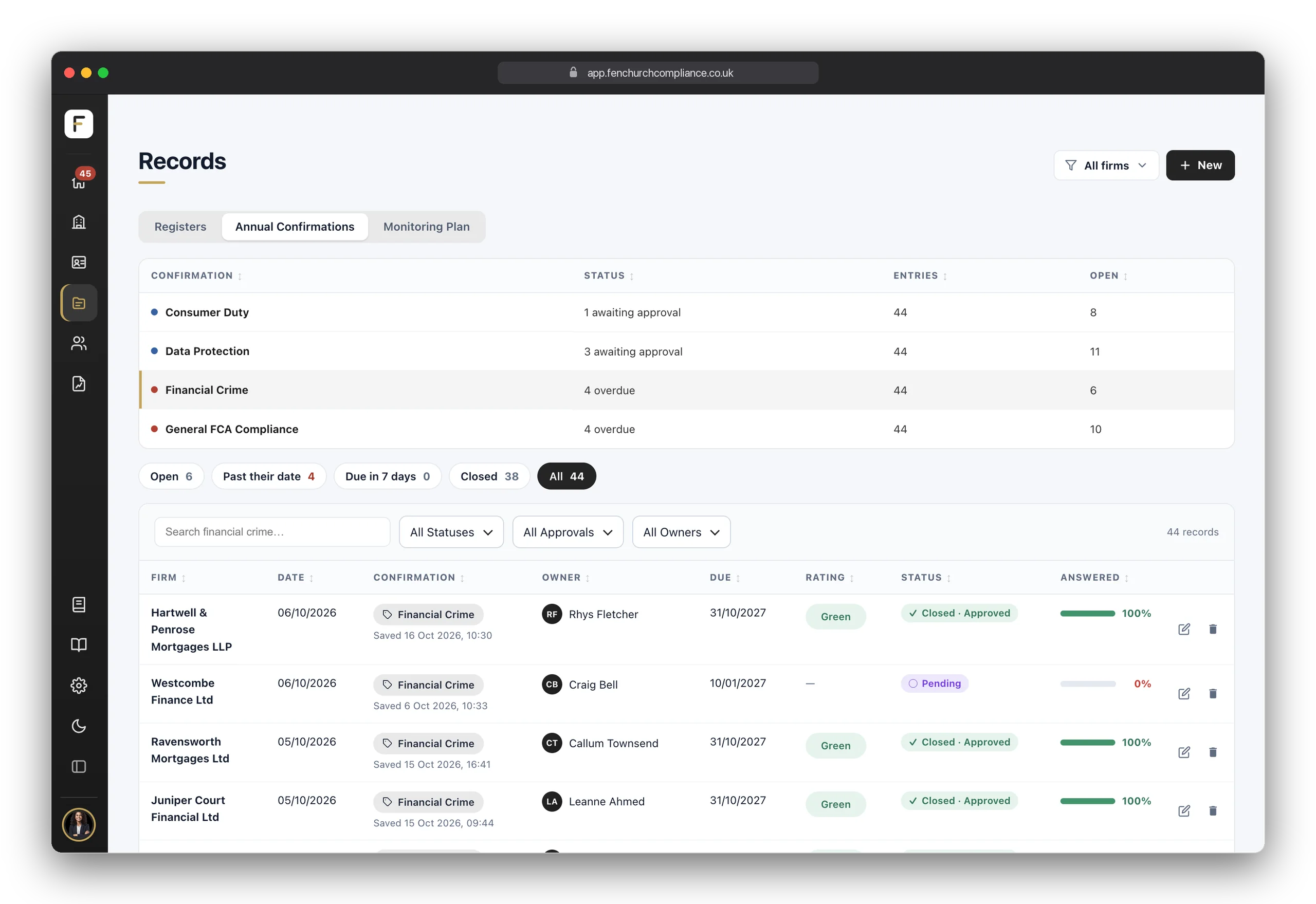
Tick what applies, enter the figures, and where a statement isn't true, write up the exception rather than hide it. Every submission is dated and kept. Records, the fourth place in the sidebar, lists each one with its owner, due date, rating, approval and how much of it is answered, across every firm.

  • The rule, explained firstEach section opens with what the requirement is, which Handbook chapter it comes from, and what a good answer looks like.
  • Exceptions written up, not hiddenIf a statement isn't true this period, say so and explain — that is the evidence a supervisor wants to see.
  • Dated and keptEvery submission stays on the firm's record with its date and completeness, so last year's answer is still there next to this year's.
  • Core set on Starter, full library on GrowthThe General FCA Compliance and Financial Crime Annual Confirmations on every plan; Consumer Duty and Data Protection from Growth. See the plans.

Stop four

The records the FCA expects, ready in advance

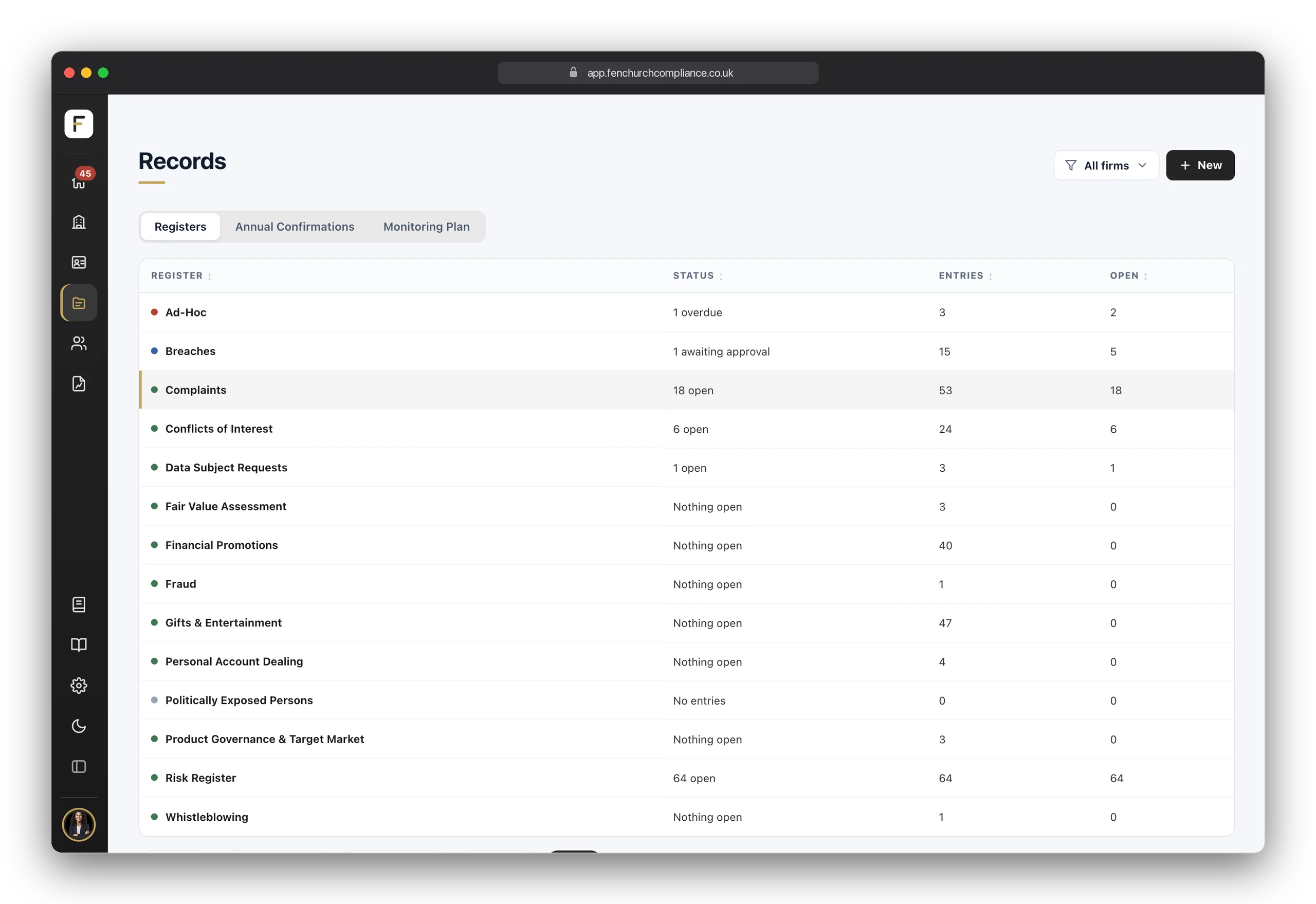
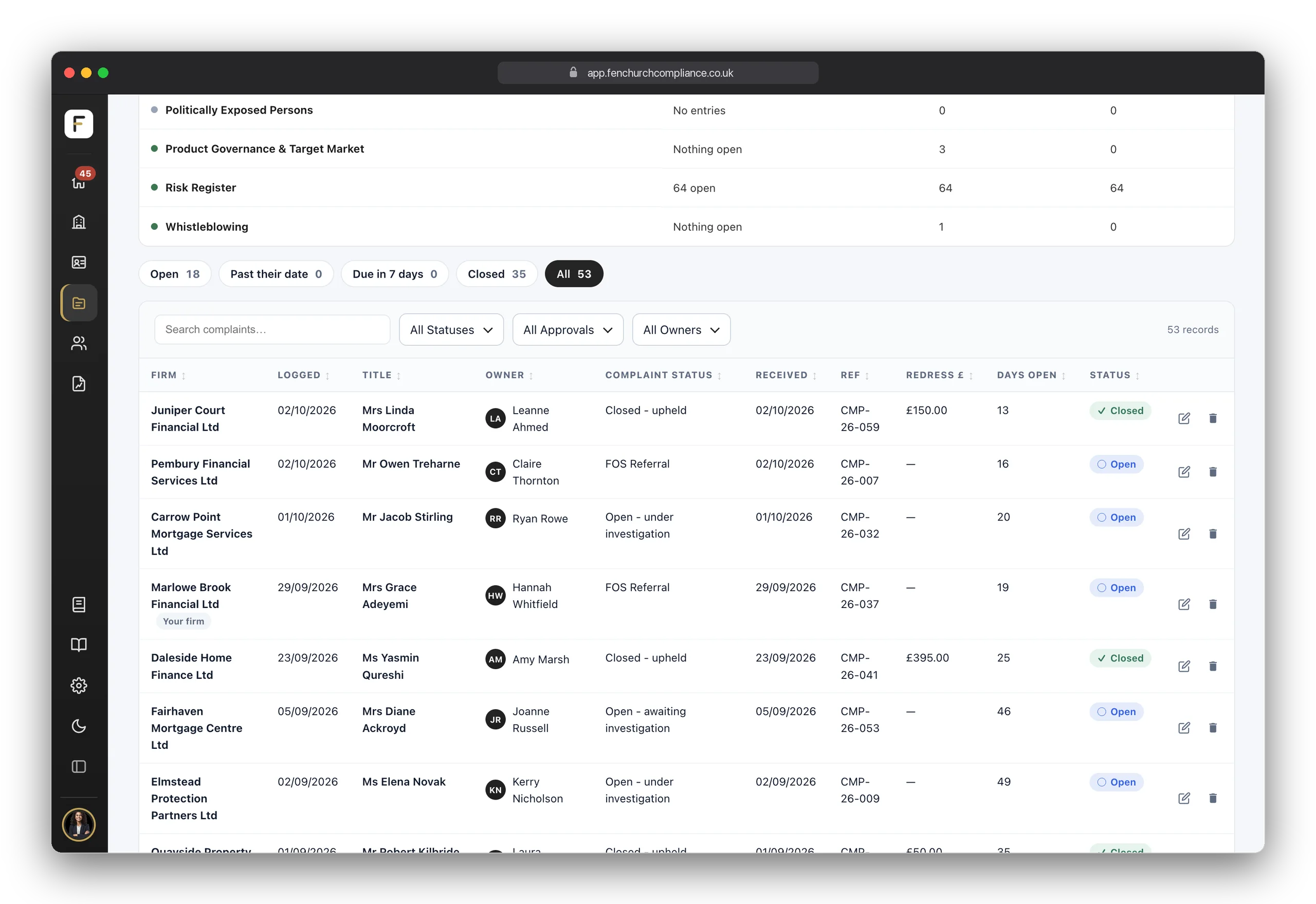
Breaches, complaints, conflicts, gifts and entertainment, financial promotions, whistleblowing, data-subject requests — the registers the regulator expects you to hold are already built, so the moment something happens there is somewhere to put it. Every entry is dated, owned and evidenced.

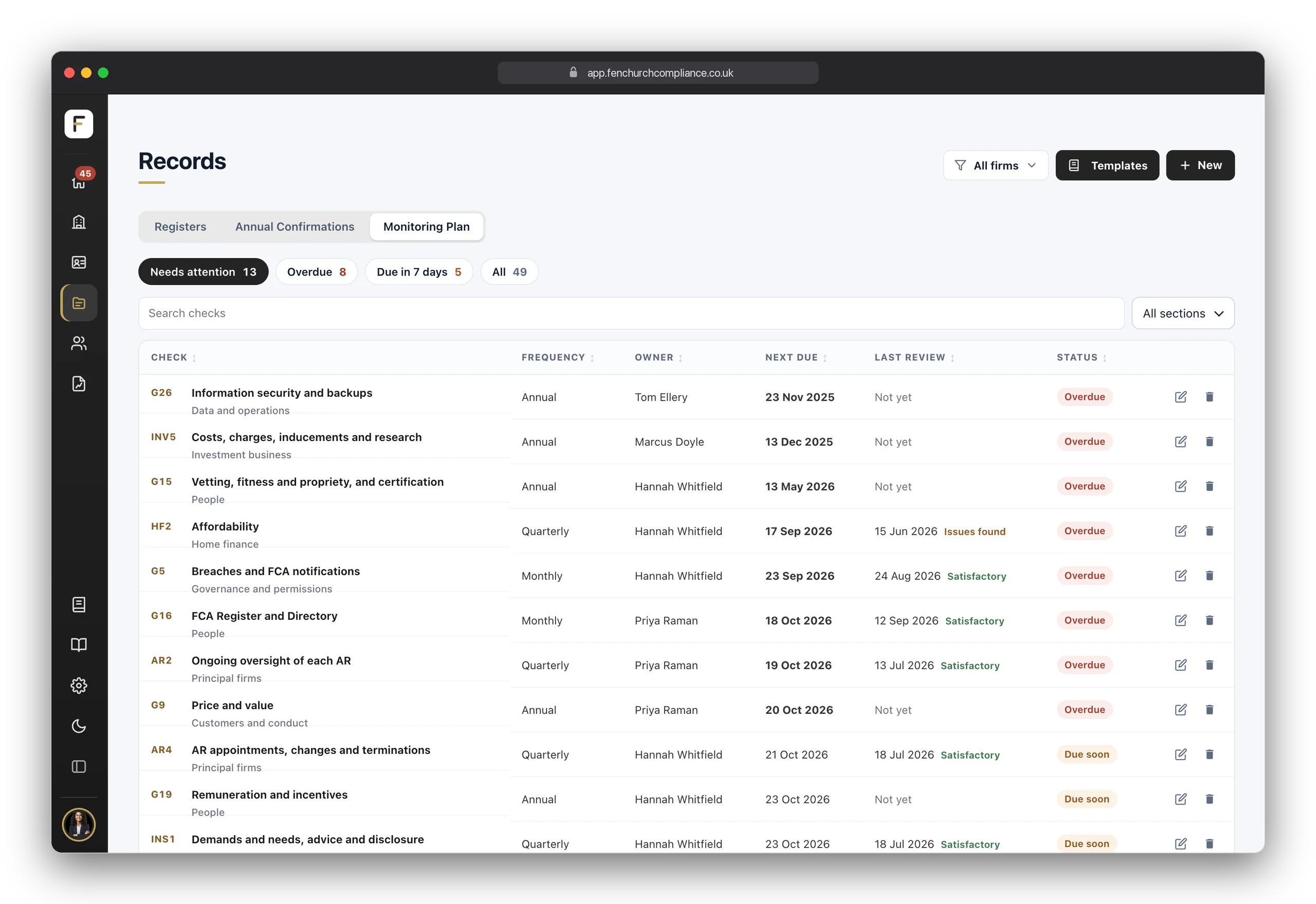
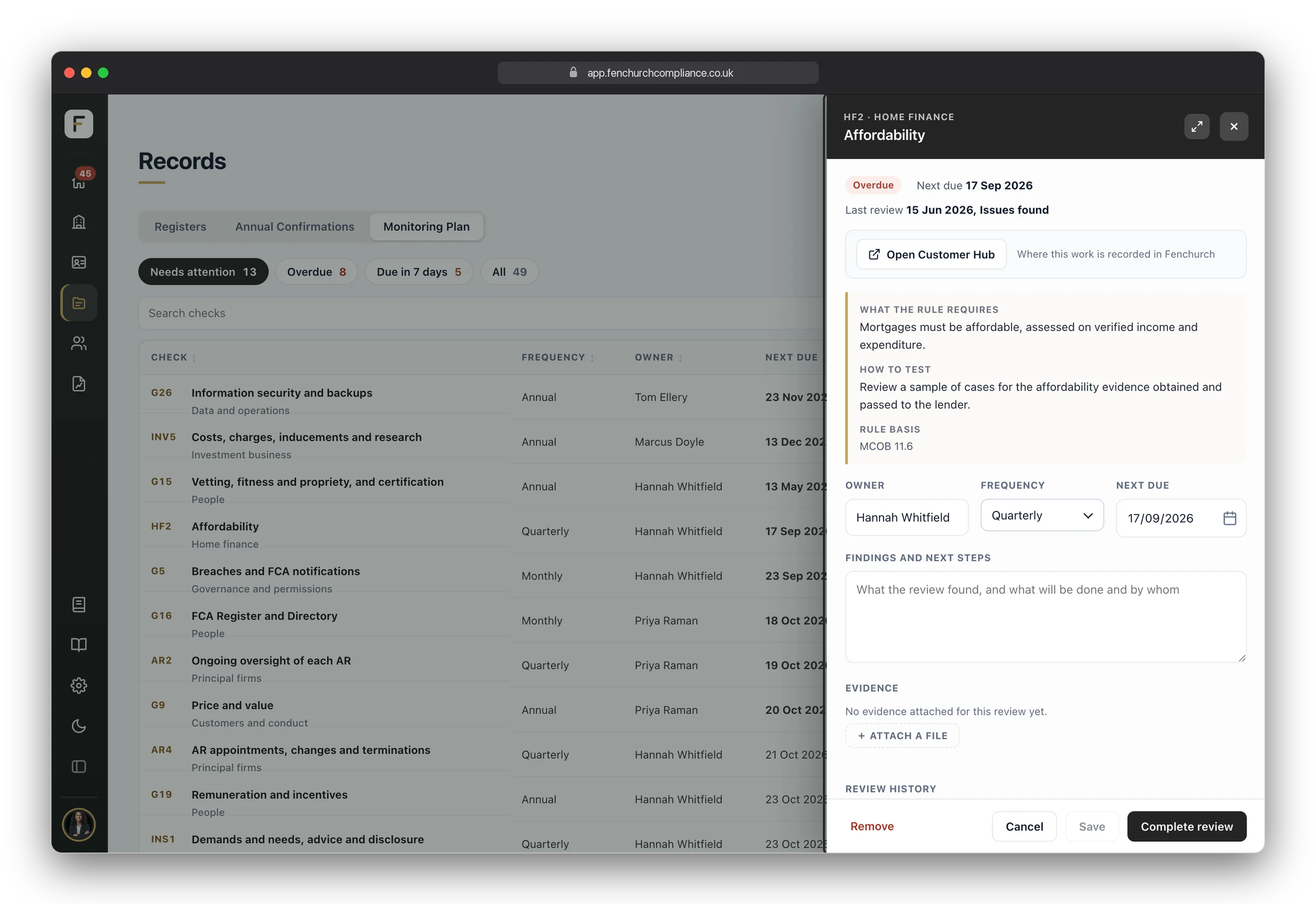
All of it sits in Records: your registers, your Annual Confirmations and, on Pro, the Monitoring Plan, one switch apart. Choose which registers each firm keeps from the library, or build your own with the form builder on any plan. The Monitoring Plan turns each obligation into a scheduled, owned check, set up from a built-in library of 80, with each review and its outcome recorded. Your policies live on each firm's record with a full version history, owner and review date.

  • The core registers on every planThe eight records every FCA firm keeps, ready on day one; all 15 registers from Growth.
  • A form builder on every planNeed a register we don't provide? Build it yourself in Settings and add it to any firm.
  • Policies with a historyUpload your own on any plan, or start from 41 expert-drafted templates on Growth. Every version is kept.
  • The Monitoring Plan and full template library ProRecurring checks, each with an owner, a frequency and a due date, recorded with their findings — plus the 44 register and 10 general templates.

Stop five

Every person, properly evidenced

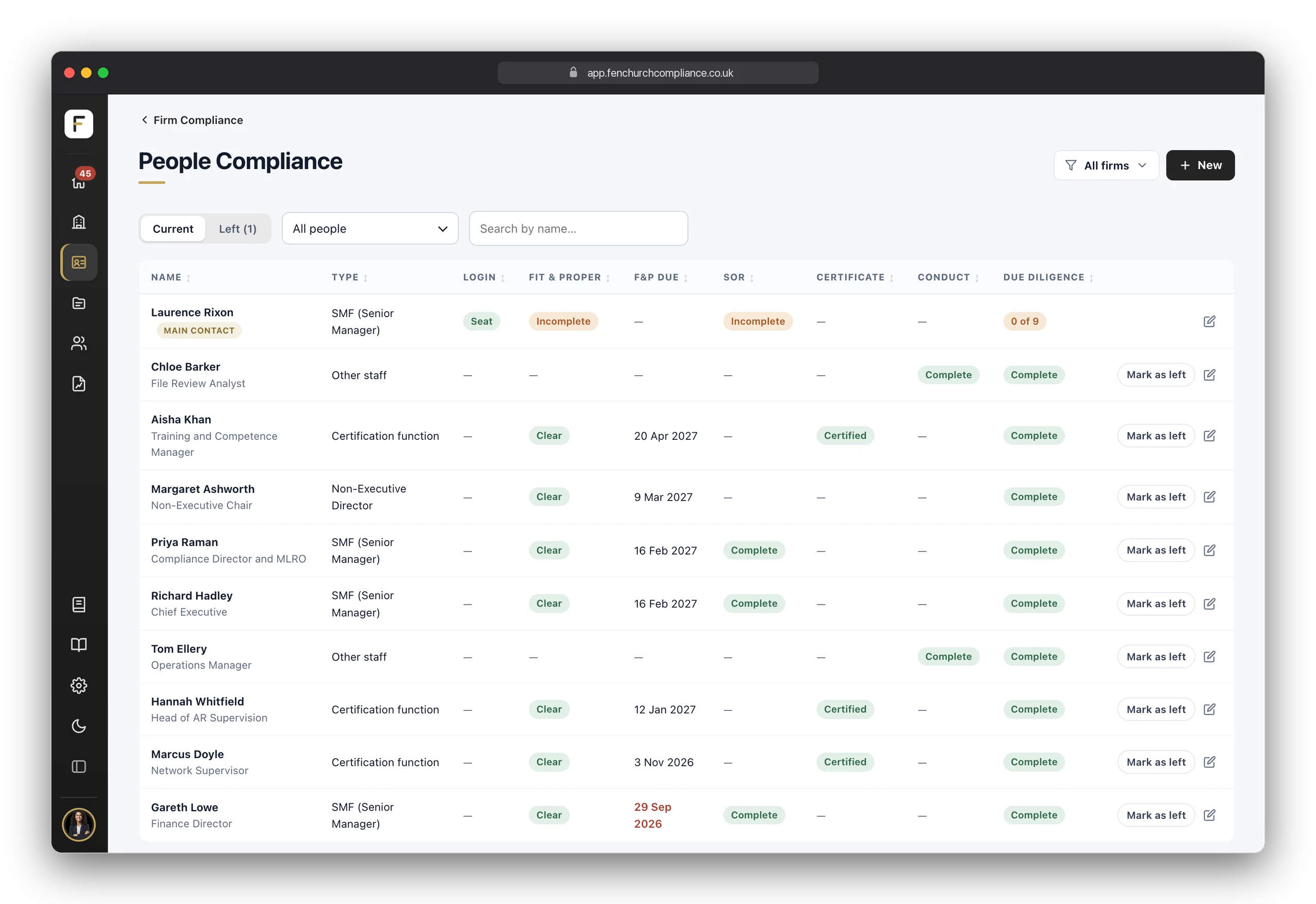
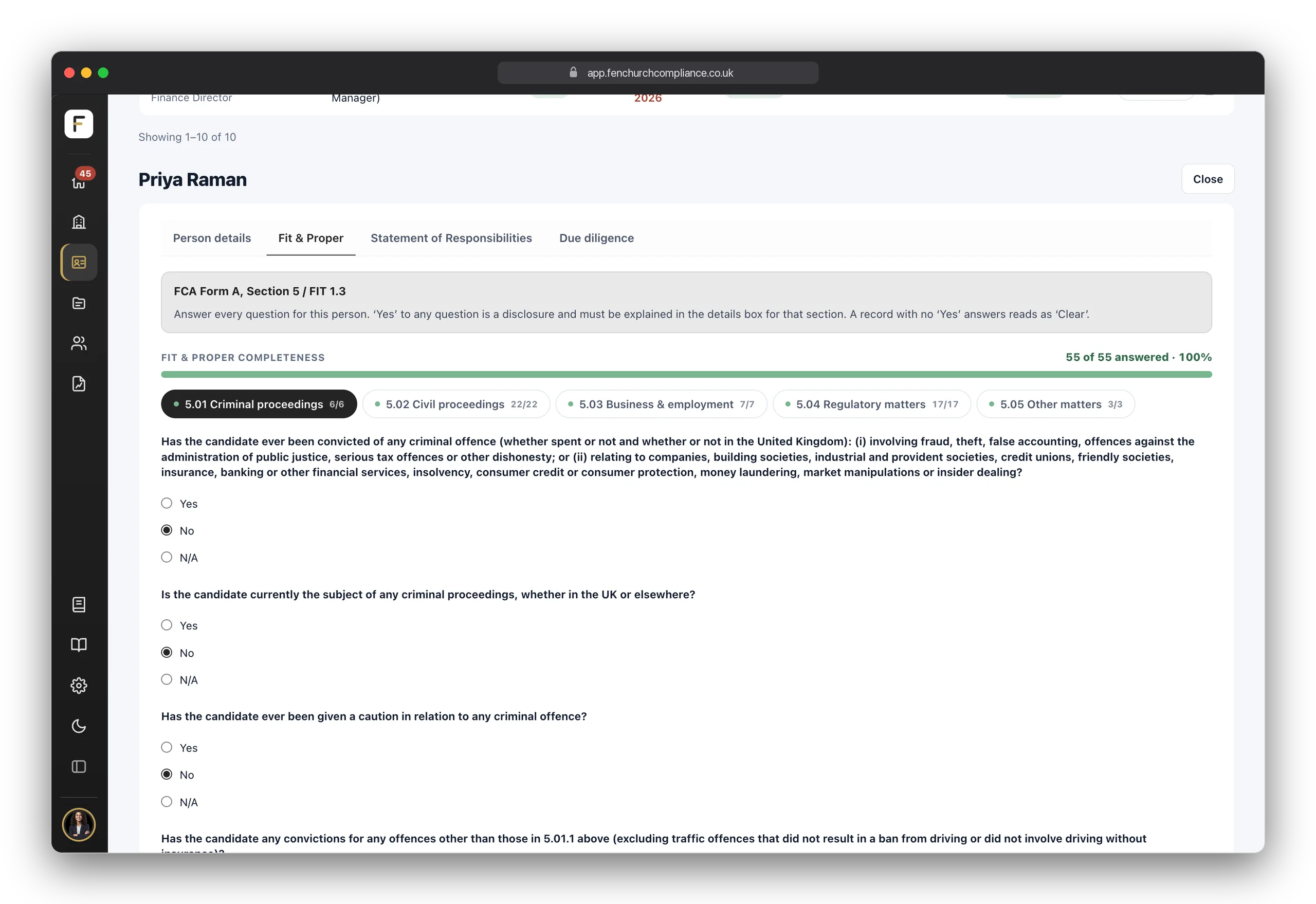
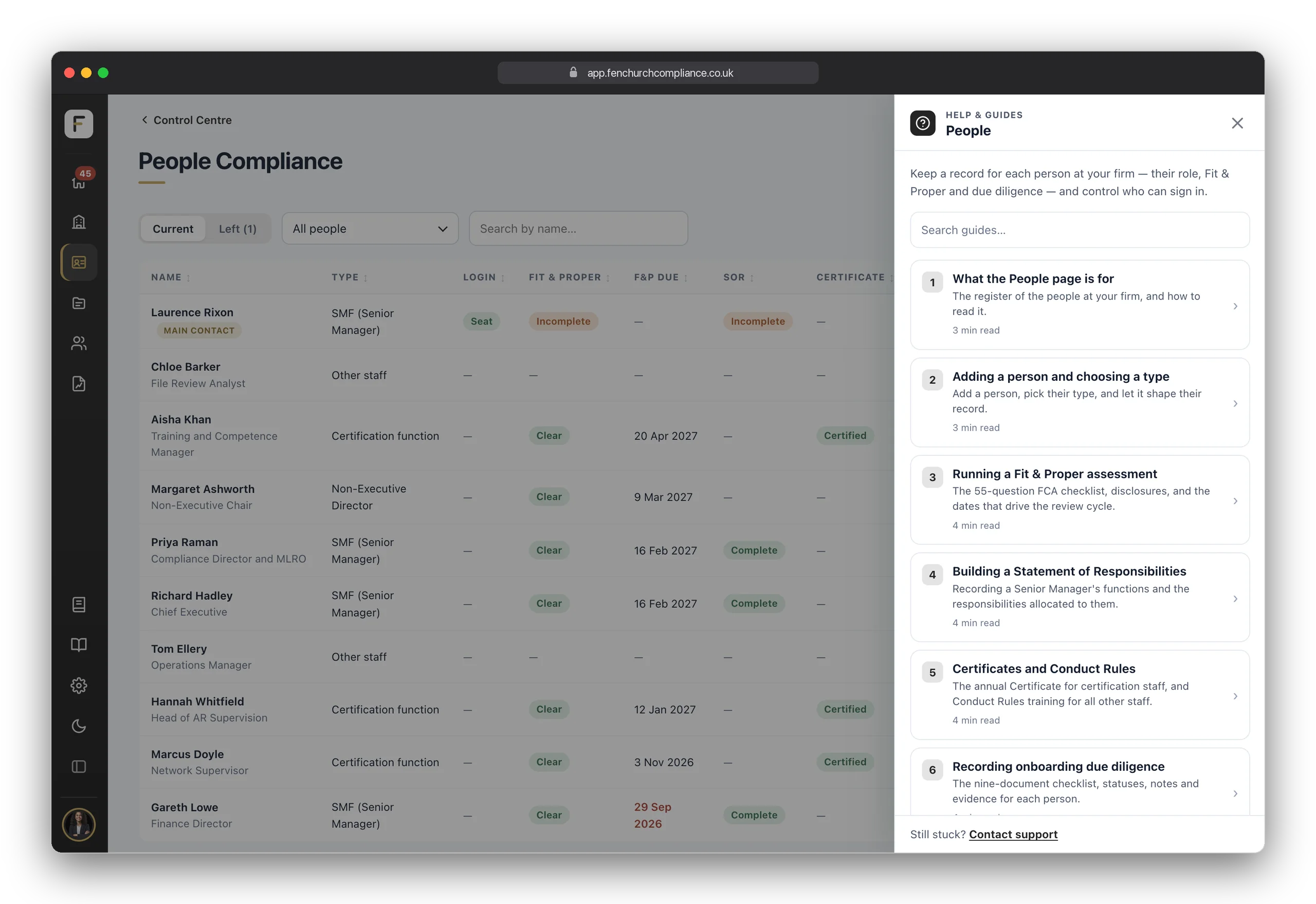
Each member of staff gets their own compliance record. The Fit & Proper tab asks every question on the FCA's Form A — criminal, civil, business, regulatory and other matters — with a completeness bar that shows exactly how much is answered. A "Yes" is a disclosure that must be explained; a record with none reads as clear.

The record adapts to the person: a Senior Manager gets a Statement of Responsibilities, a certified person the annual Certificate, and other staff the Conduct Rules. Each is assessed under the regime that applies to them — SM&CR, APER or IDD — without you needing to know the acronyms first.

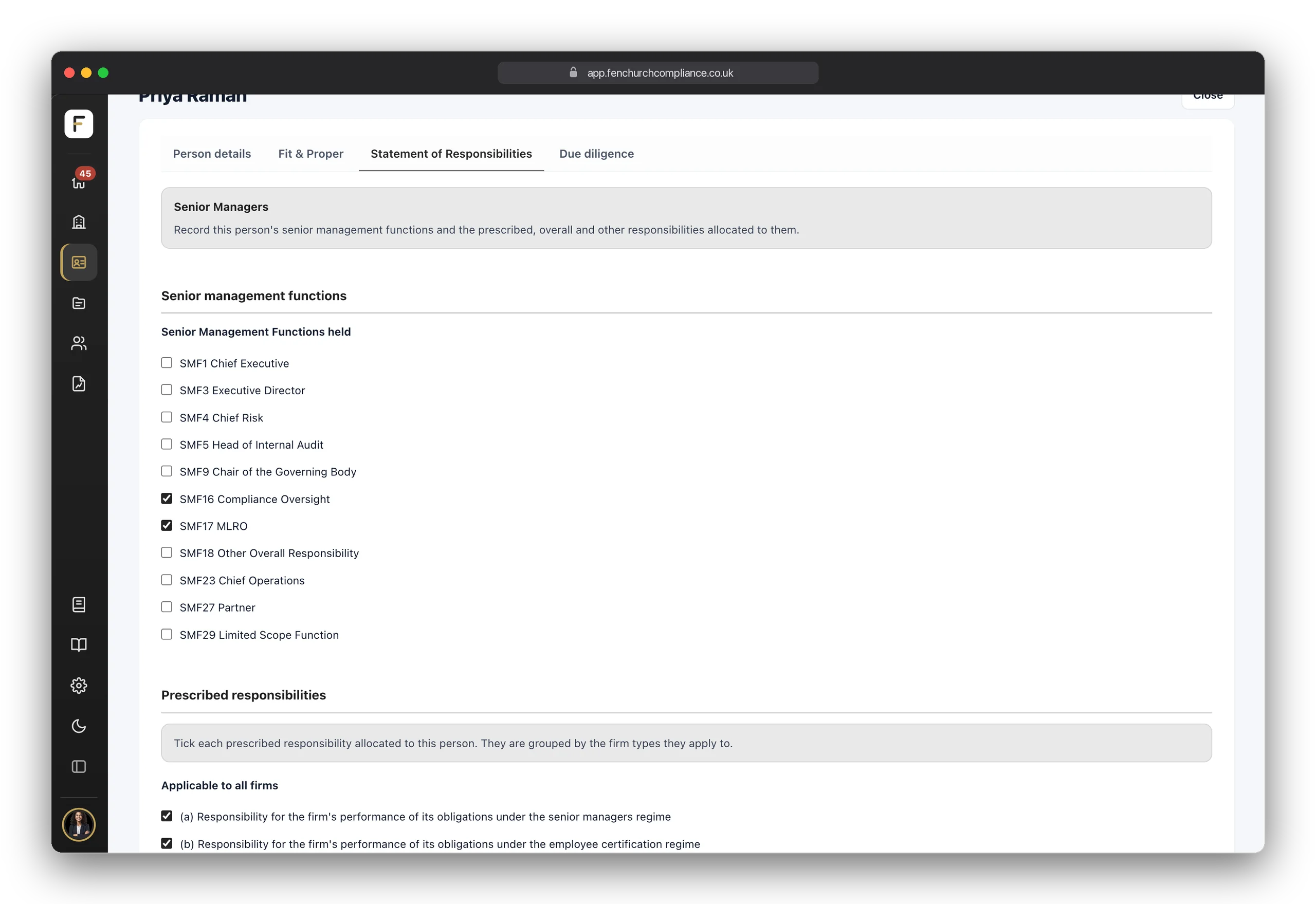
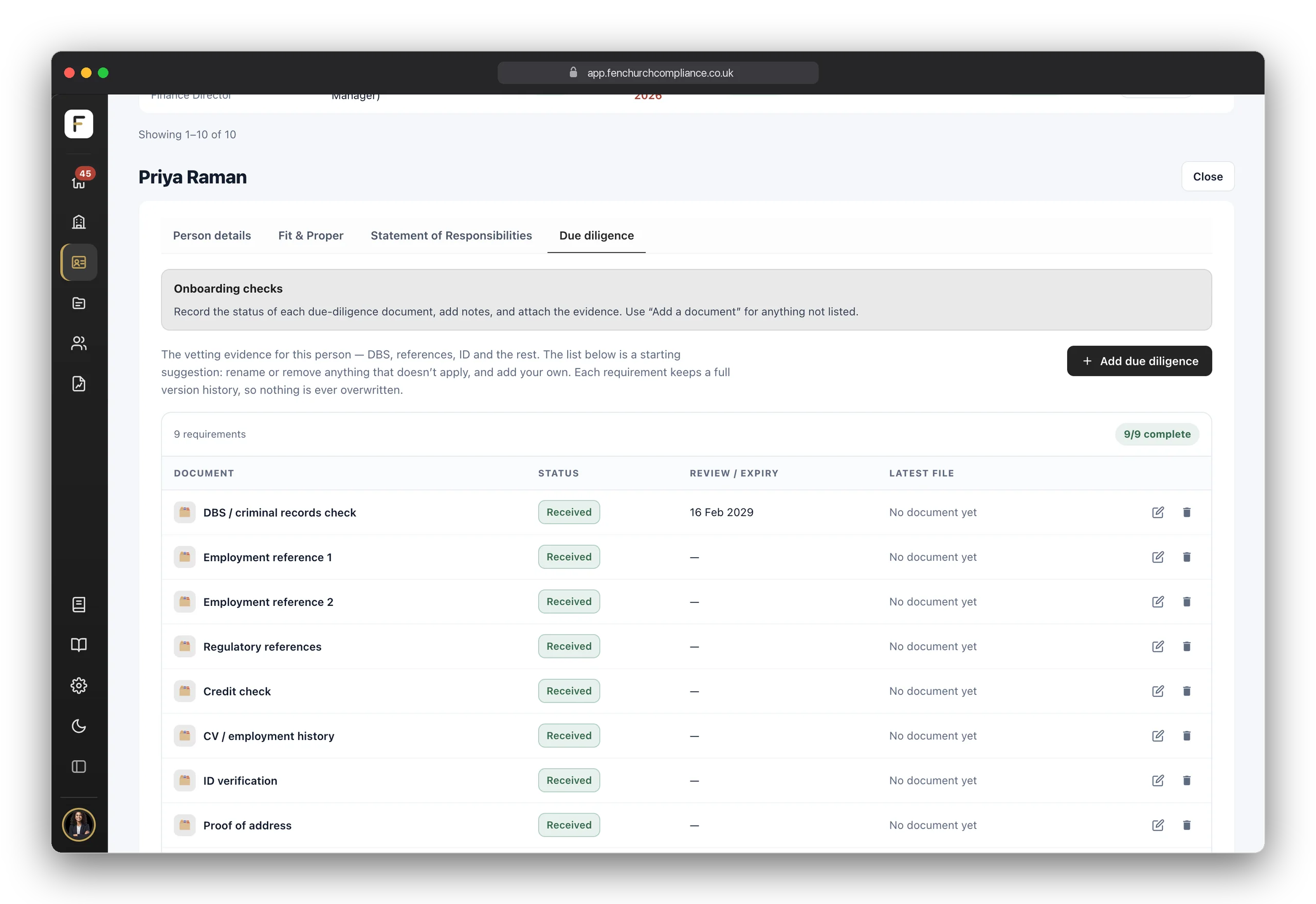
The Statement of Responsibilities tab records the senior management functions a person holds and the prescribed responsibilities allocated to them, grouped by the firm type they apply to. The Due Diligence tab holds the vetting evidence — DBS, references, ID, credit check, Form A — each with a status, a review date and the document behind it.

  • Fit & Proper, question by questionEvery Form A question, answered and dated per person — the bar reaches 100% when it's done.
  • Responsibilities, tickedSMFs held and prescribed responsibilities allocated, so the map of who is accountable for what is always current.
  • Onboarding checks with a historyEach document keeps every version ever uploaded; nothing is overwritten.
  • Unlimited people records on every planTwo staff or two hundred — only logins are counted, never people.

Stop six Pro

The Customer Hub, and every return

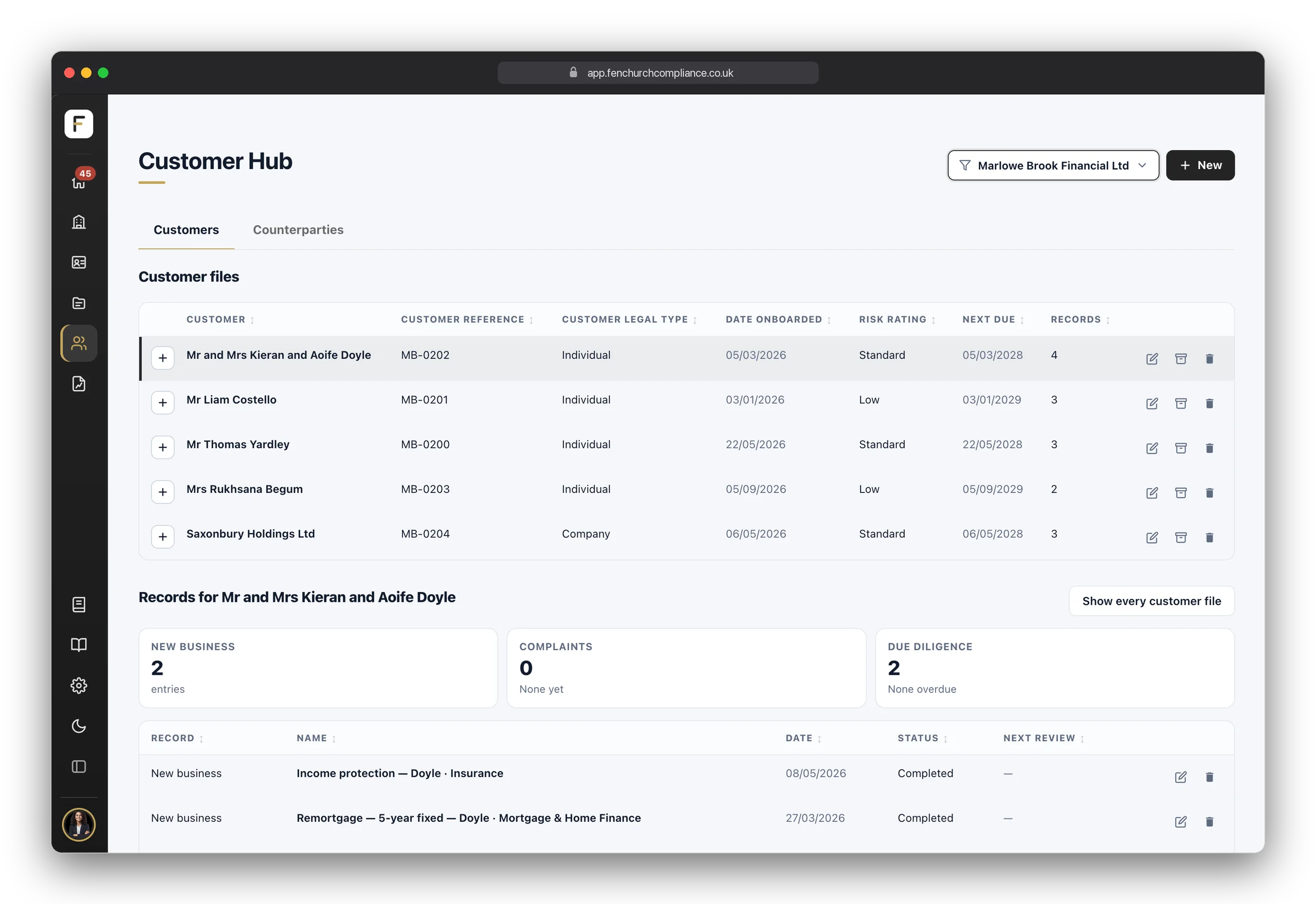
In the Customer Hub, Customers in the sidebar, each customer has one file, and its records sit beneath it: the new business written, the complaints raised and the due diligence done — who they are, how their identity and address were verified, how they were screened, their risk rating and when they are next due for review. A second tab covers the checks a firm runs on its counterparties: providers, introducers and other third parties.

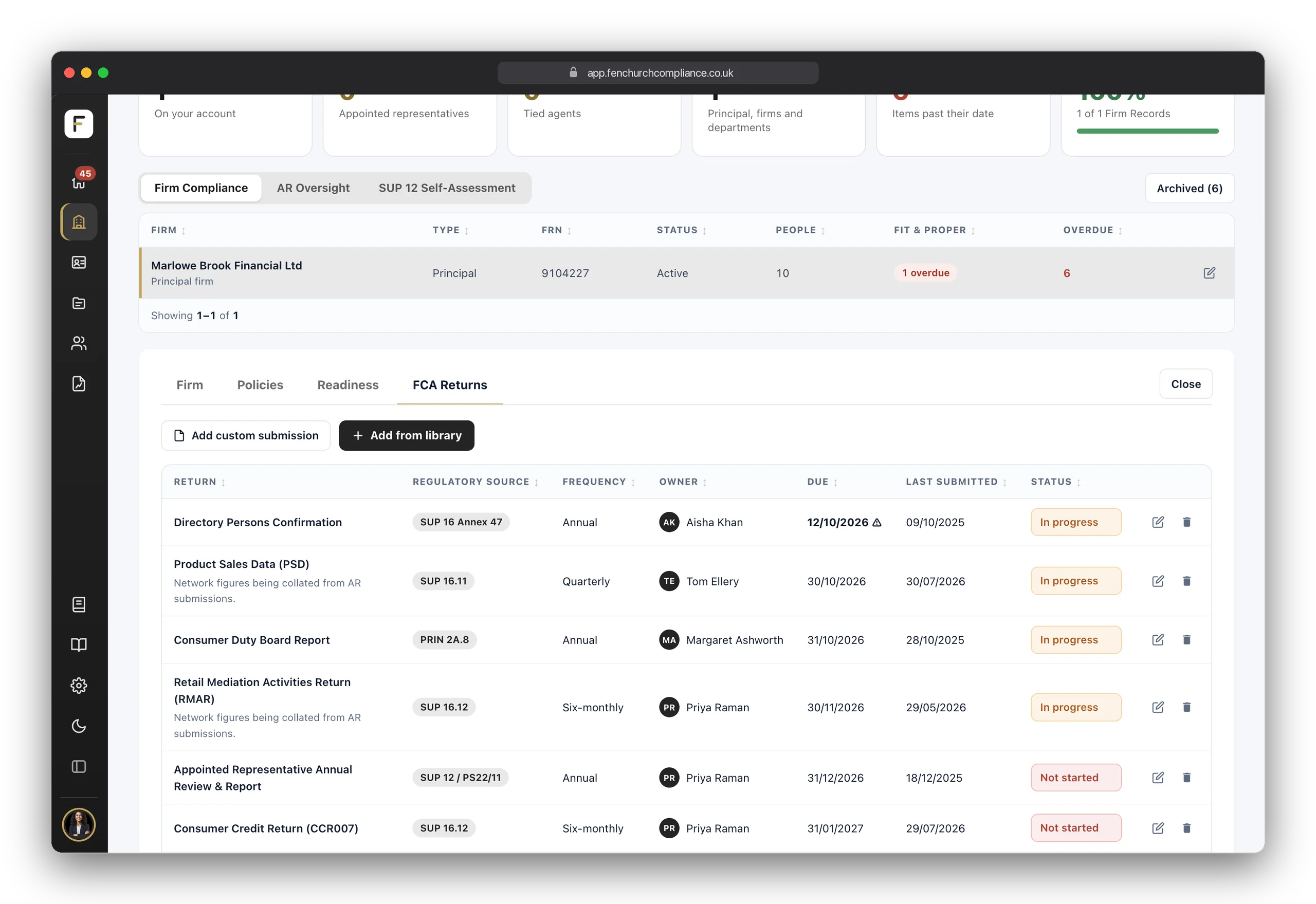
FCA Returns, a tab of your firm's record, lists every RegData submission your firm owes, with its source, frequency, owner, due date and when it was last submitted, so regulatory reporting is tracked in the same place as everything else, not in a personal diary.

  • One file per customerNew business, complaints and due diligence held together on the customer's file, counted at a glance.
  • Initial and periodic reviewsRecord the review type and the date, so the next review has a date to be due on.
  • Counterparties tooThe same discipline for the firms you rely on, not only the customers you take on.
  • Every RegData deadlineTemplates for the most common returns, with room for your own bespoke ones alongside.

Stop seven

When the regulator says “show me”, show them

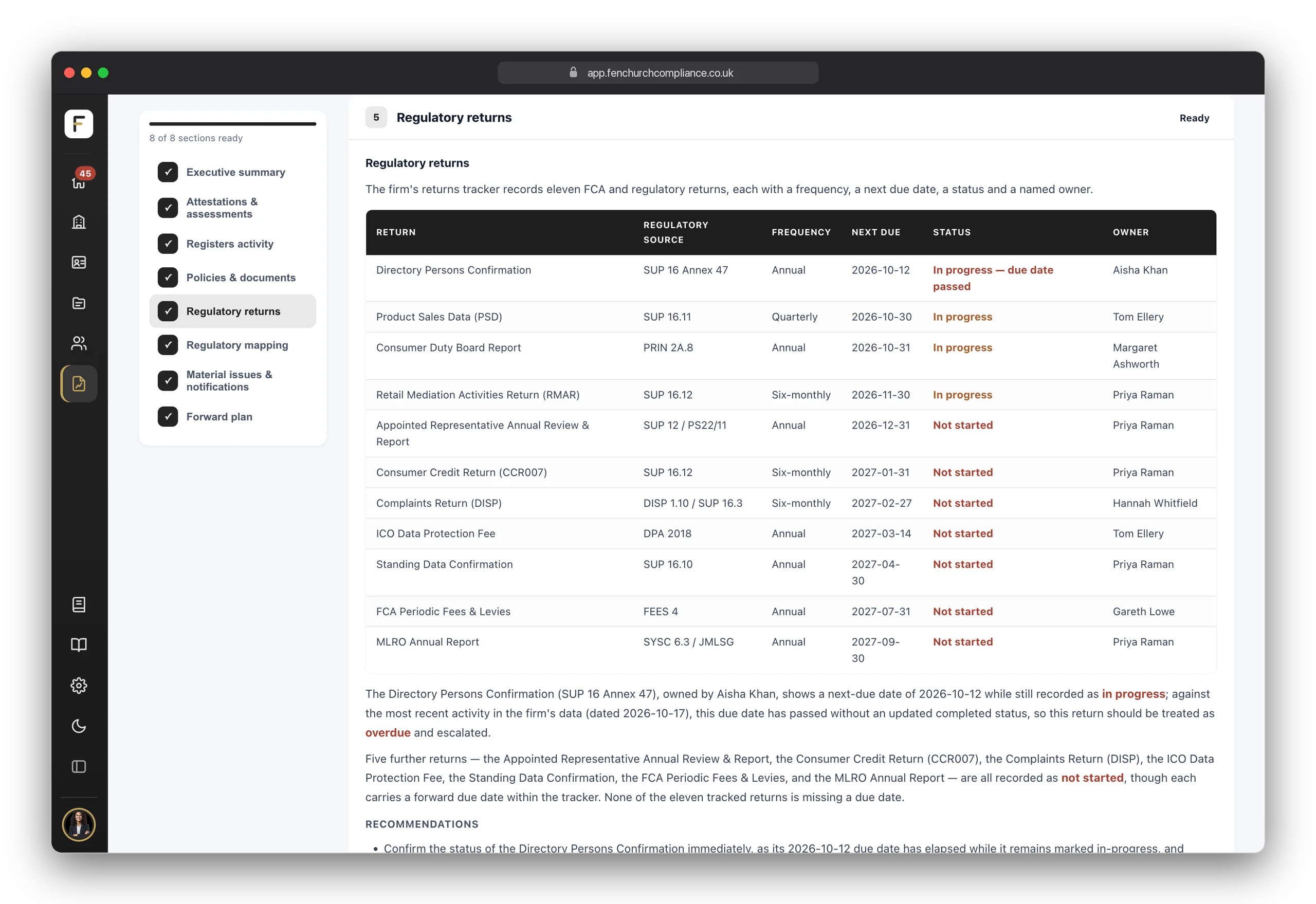
Everything you've recorded, read back to you as a report your directors and the regulator both understand. Reports, the last place in the sidebar, opens it. Every plan has the Executive Summary — a one-page briefing for your directors. Growth and Pro add the full eight-section compliance report, mapped to the rules with the gaps called out honestly, and Pro adds the FCA Dry Run: a fourteen-question mock supervisory interview.

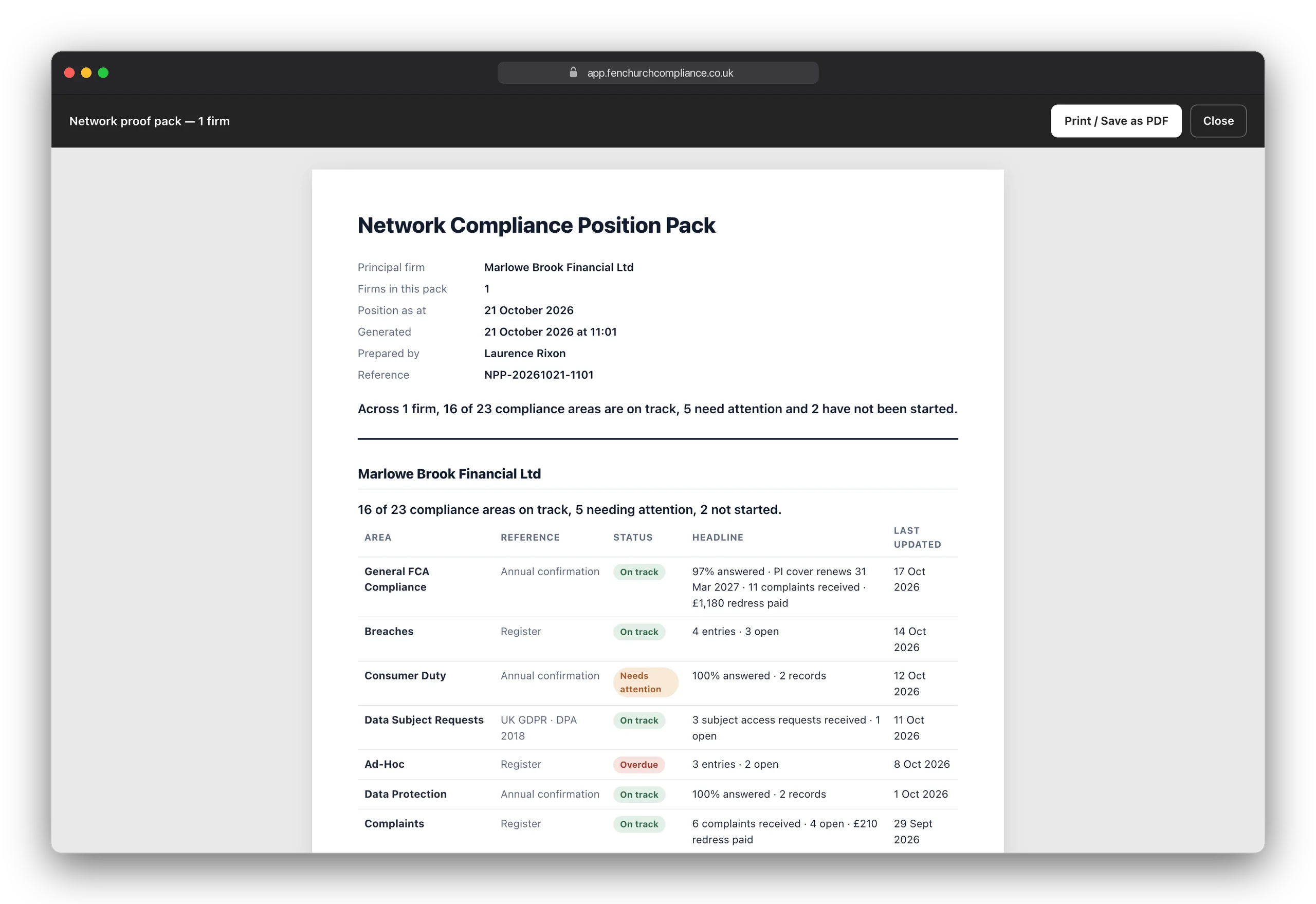
When an auditor, your directors or the FCA asks, the proof pack, under Share on the + New button, builds a branded, dated pack: your position, your open items and the records behind them. Or share a read-only Live Link, with an optional passcode and expiry, and revoke it whenever you like.

  • Drawn only from your recordsThe reports are written from what your firm has entered and nothing else. A person always reviews and decides.
  • Executive Summary on every planA one-page briefing for your directors, on demand.
  • The full report Growth + and the Dry Run ProEight sections mapped to the rules; then fourteen questions a supervisor would actually ask.
  • A proof pack and a Live LinkA dated evidence bundle in one click, or a read-only link you control.

Stop eight · Network

For principal firms: every AR in view, and the self-assessment that proves it

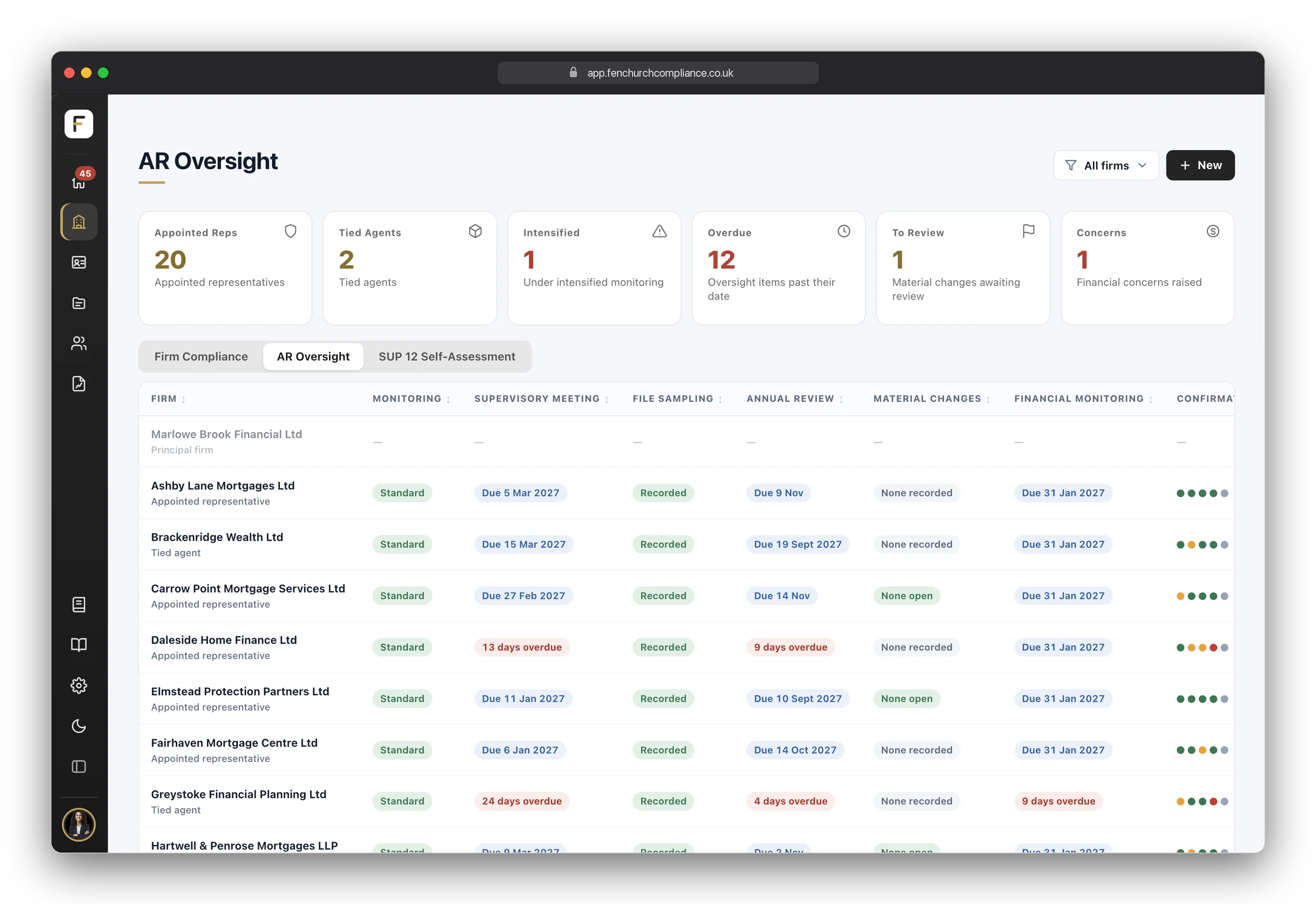
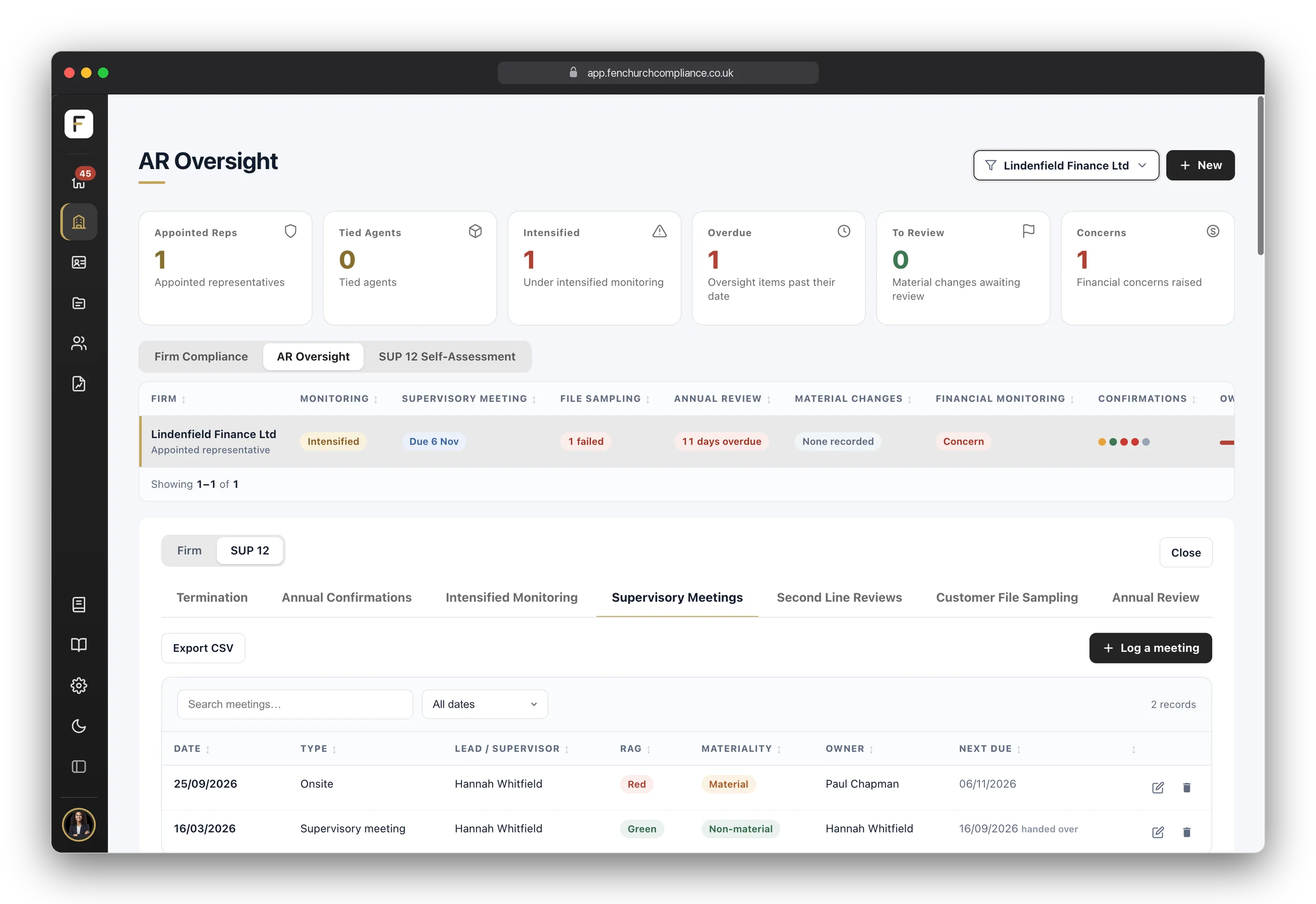
On the Network plan, every Appointed Representative and tied agent is a firm of its own, with its own portal: it completes its Annual Confirmations, registers and people records there, and you approve them. Firms gains two more views. AR Oversight puts every AR in one table, with where it stands in each area of your oversight: monitoring, supervisory meetings, file sampling, the annual review, material changes, financial monitoring and its Annual Confirmations. Click an AR and its oversight records open beneath, a tab for each.

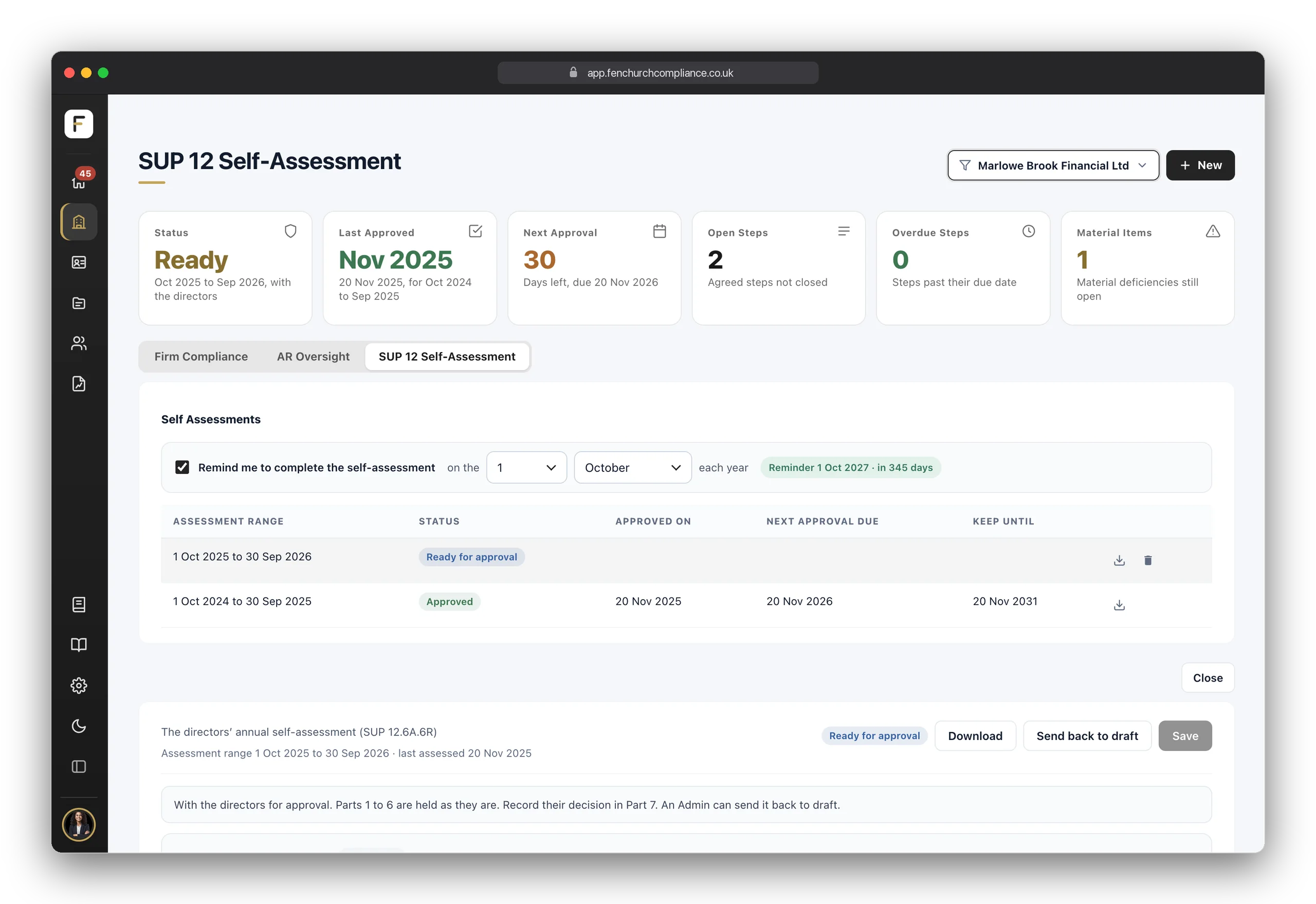
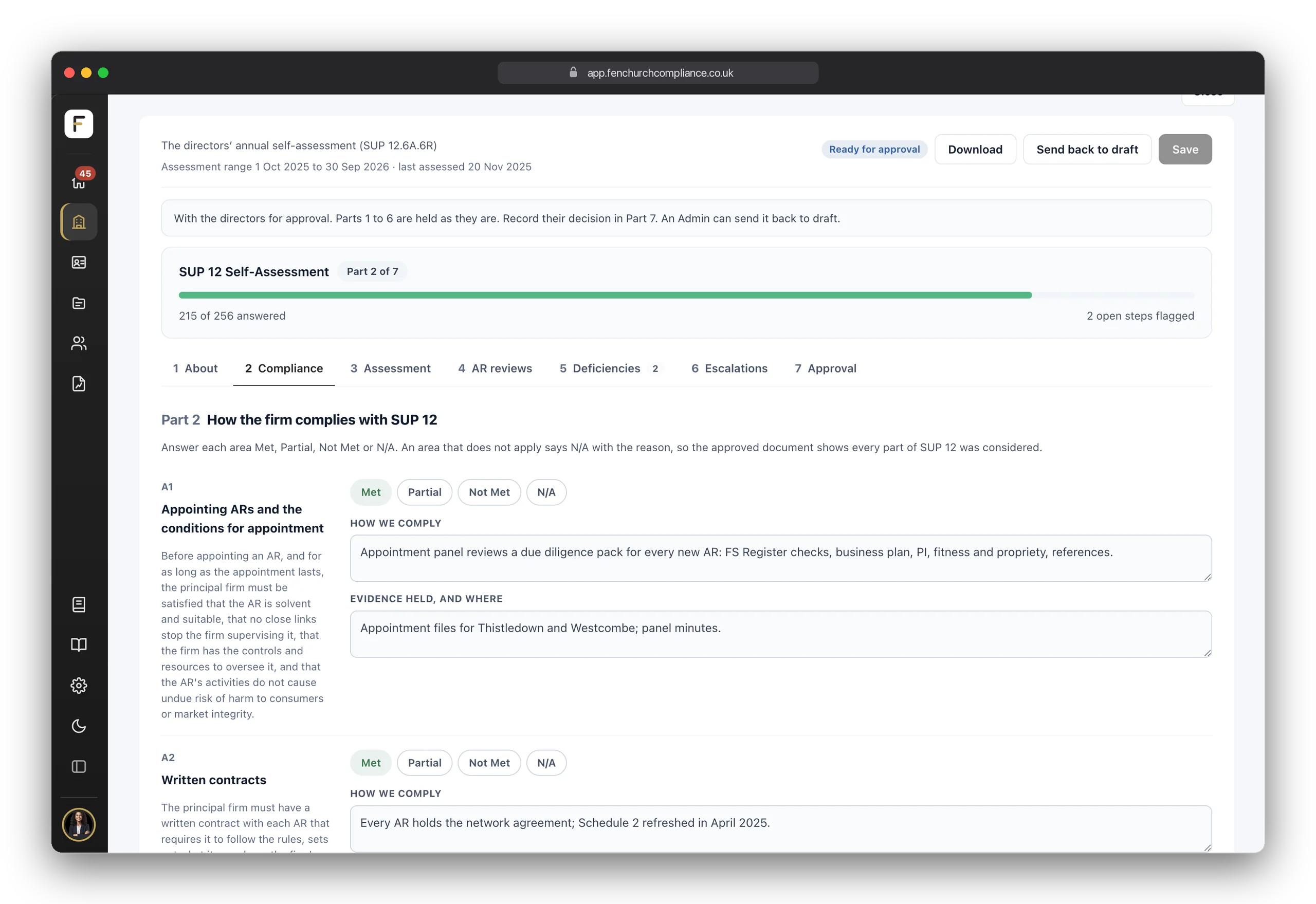
The SUP 12 Self-Assessment is the annual document your directors must review and approve under SUP 12.6A.6R, kept as a form in seven parts. It is filled from the oversight records you already keep, the steps you agree are chased on their due dates, and each approved version is locked and kept for six years.

  • A firm and a portal per AREach AR sees only its own records; you see all of them, at record level.
  • AR OversightEvery AR and tied agent in one table, with a status for each area of your oversight.
  • Oversight records per ARIntensified monitoring, supervisory meetings, second-line reviews, file sampling, annual review, material changes, FCA correspondence and financial monitoring.
  • The SUP 12 Self-AssessmentSeven parts, from how the firm complies to the directors' approval, ready as a paper for the meeting.

Built around how firms actually work

One firm — or one for every part of it

Each firm is a self-contained set of records. Most customers run one, their own firm; it can also be an appointed representative, or a team, department, branch or office you want kept separate.

Each firm keeps its own registers, people, documents and reports, separate from every other. Run one for the whole business, or one per team, branch or group entity. When a new one comes along, add it in moments, within your plan's limits — no support ticket, no waiting.

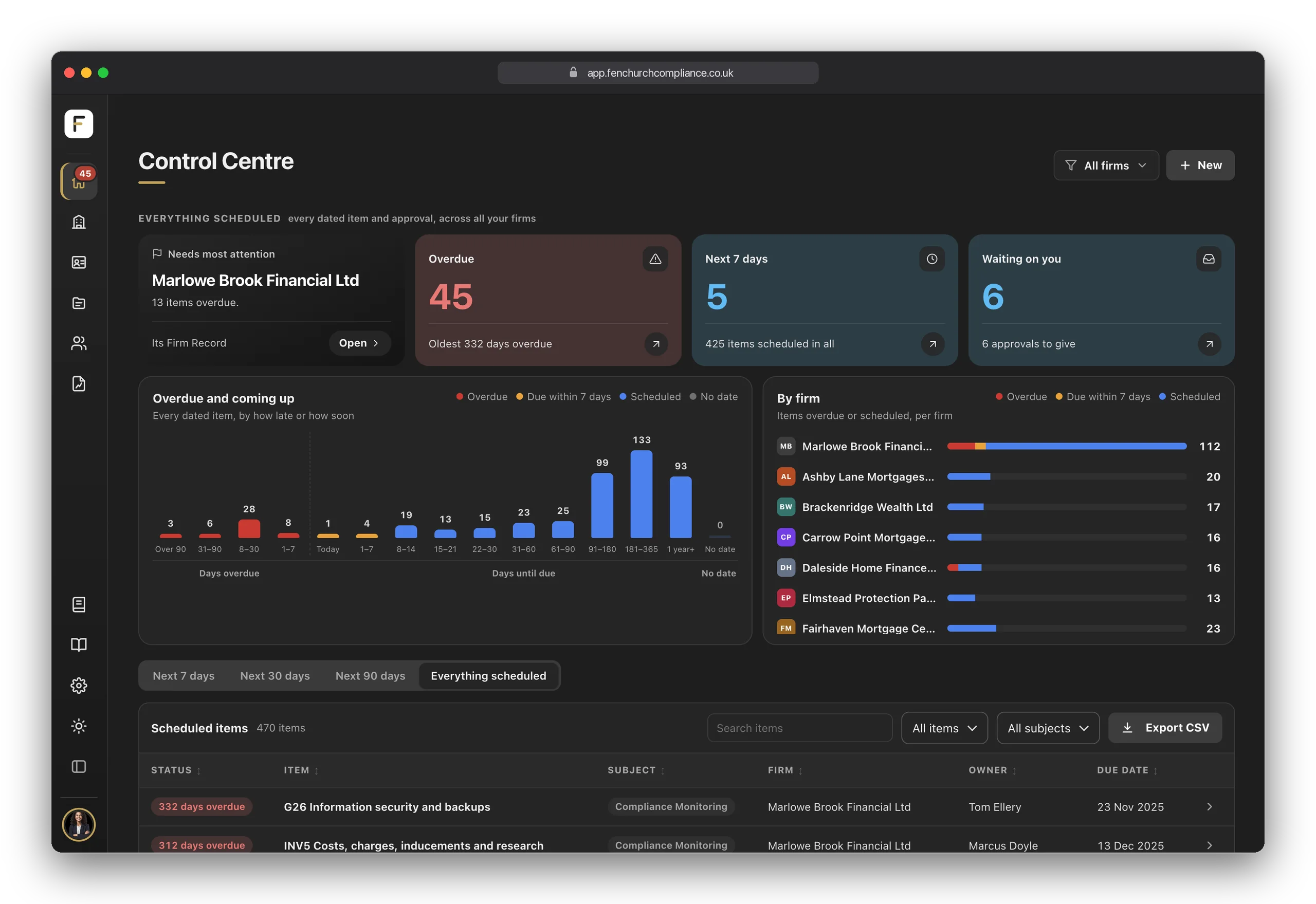
On Pro, make it yours: your logo and your colours across the platform, the reports and the shared Live Links, so the people you oversee see your brand, not ours. And every user chooses how the platform looks: a dark sidebar, the default, all light, or all dark.

  • Firms on every planOne on Starter, three on Growth, unlimited on Pro.
  • Isolated accessEach user sees only the firms they have been given access to — set per person, per firm.
  • Add a firm in a clickNew team, new branch, new group entity: it is ready in moments.
  • White label ProYour brand across the platform, its reports and every Live Link.
  • Light, dark or dark sidebarEach user picks the appearance, or lets it follow their computer.

Getting started

Guided from day one

No implementation project, no training course and no onboarding call to book.

Choose Starter, Growth or Pro on the pricing page; principal firms wanting Network contact us. Starter, Growth and Pro start with a fourteen-day free trial, with no card needed, and runs month-to-month once you subscribe — there's nothing to install and no sales call to sit through.

Signing in is passwordless: enter your email address, we send you a code, and you're in. At the first sign-in you set up your firm: enter its FRN and its details, its permissions and, for a principal, its appointed representatives and tied agents are read from the FCA's register. Then a short guide tailored to your plan points you at what to do first, and plain-English tutorials sit on every screen — so you're never stuck.

  • Passwordless sign-inA code to your email when you sign in. No passwords to remember — or to leak.
  • Fourteen days freeNo card needed. Subscribe from inside the app when you are ready, and everything you set up is kept.
  • Set up from your FRNYour firm's details and permissions come from the FCA's register, then a guide tailored to your plan takes it step by step.
  • Help on every screenPlain-English tutorials sit one click away, wherever you are in the platform.

Questions

Before you ask

The things people usually want to know once they've seen the platform.

Is everything on this page included in the price?

Yes — pick a plan and every feature at that tier is included. Starter is £150 a month, Growth £250, Pro £375 and Network, for principal firms, £750 including 3 Appointed Representatives, then £50 per AR per month. Where a feature belongs to a higher plan, it's marked on this page.

What's the difference between the plans?

Starter includes one firm, the core registers and Annual Confirmations every firm keeps, unlimited people records, the Control Centre, the AI Executive Summary and the form builder. Growth adds up to three firms, the full form library — every specialist register and Annual Confirmation — the 41 policy templates and the full 8-section AI Compliance Report. Pro adds unlimited firms, the register and general document libraries, the Monitoring Plan, the FCA Returns tracker, the Customer Hub, white-labelling and the FCA Dry Run. The full comparison is on the pricing page.

What happens after the fourteen days?

Subscribe from inside the app and billing starts, month-to-month, with everything you set up kept. If you do not subscribe, the account becomes read only and is deleted 60 days after the trial ends. Once subscribed, you can change plan or cancel from the billing portal at any time.

How long does setup take?

There's no implementation project. Pick a plan, sign in with an email code, enter your FRN and your firm is set up the same day. From there, most of the "setup" is simply starting to record — the platform is ready before you are.

Do I need a compliance background to use it?

No. Fenchurch One is built for the founder, director or office manager who ended up holding compliance. The Annual Confirmations set out what needs to be done and why, the getting-started guide takes you through it step by step, and plain-English tutorials sit on every screen.

We already have policies and spreadsheets — can we bring them across?

Yes. Upload your existing policies on any plan — each one keeps its version history from there — and start adding register entries as things happen. On Growth and Pro you can also draw on the ready-made template library where your own documents have gaps.

Can my team use it too?

Yes. Starter includes 3 logins, Growth 10 and Pro unlimited, and people records are unlimited on every plan. Access is granted per person, per firm: a Basic user sees their own people record, while users given wider access see all the people records on their firms.

How do the AI reports actually work?

Each report is drafted from your firm's own records — nothing invented, nothing generic. If it isn't evidenced in the platform, it isn't in the report. There are three types: the Executive Summary on every plan, the full AI Compliance Report on Growth and above, and the FCA Dry Run — a 14-question mock supervisory interview — on Pro. You can run one complete report of each type per firm every seven days.

Can I show an auditor my compliance position without giving them a login?

Two ways. A Live Link gives a read-only view — with optional passcode, expiry and watermark, a view log, and the ability to revoke it at any time — and it shares summaries rather than your raw records. Or export the proof pack: a dated, referenced snapshot of your position you can hand to an auditor or the regulator.
You've seen it. Now run it.

Fourteen days free, no card needed. Sign in with an email code, enter your FRN and we take it from there — or book a demo and we'll walk you through your own firm's set-up.

The Fenchurch Newsletter

One email a month: straightforward FCA guidance, product updates and the dates worth knowing. No noise.

You’re subscribed — check your inbox!