You set them up
Add the Annual Confirmations, registers and policy templates each AR needs, from your side.
Network — for principal firms
Network is the Fenchurch One tier for principal firms supervising Appointed Representatives. Every AR gets its own record and its own portal, so what they complete and what you approve is kept as you go — not chased up after the fact.
Not supervising any Appointed Representatives? See Starter, Growth and Pro
What it covers
A principal firm holds FCA authorisation and appoints other firms (its Appointed Representatives) to operate under that permission, giving them a faster route to market than seeking their own. Supervising them properly is a regulatory duty, not a choice. Fenchurch tracks and evidences what you do — it doesn't do the oversight for you. Network gives you the record, the portal and the roll-up to run it properly.
The AR portal
Each AR gets its own login and sees only its own firm. You choose what appears there.
Add the Annual Confirmations, registers and policy templates each AR needs, from your side.
Each AR signs into its own space and works through what's outstanding. Nothing else is visible to them.
Every submission is kept against that AR's record, dated, and rolled into your network-wide view.
SUP 12 Self-Assessment
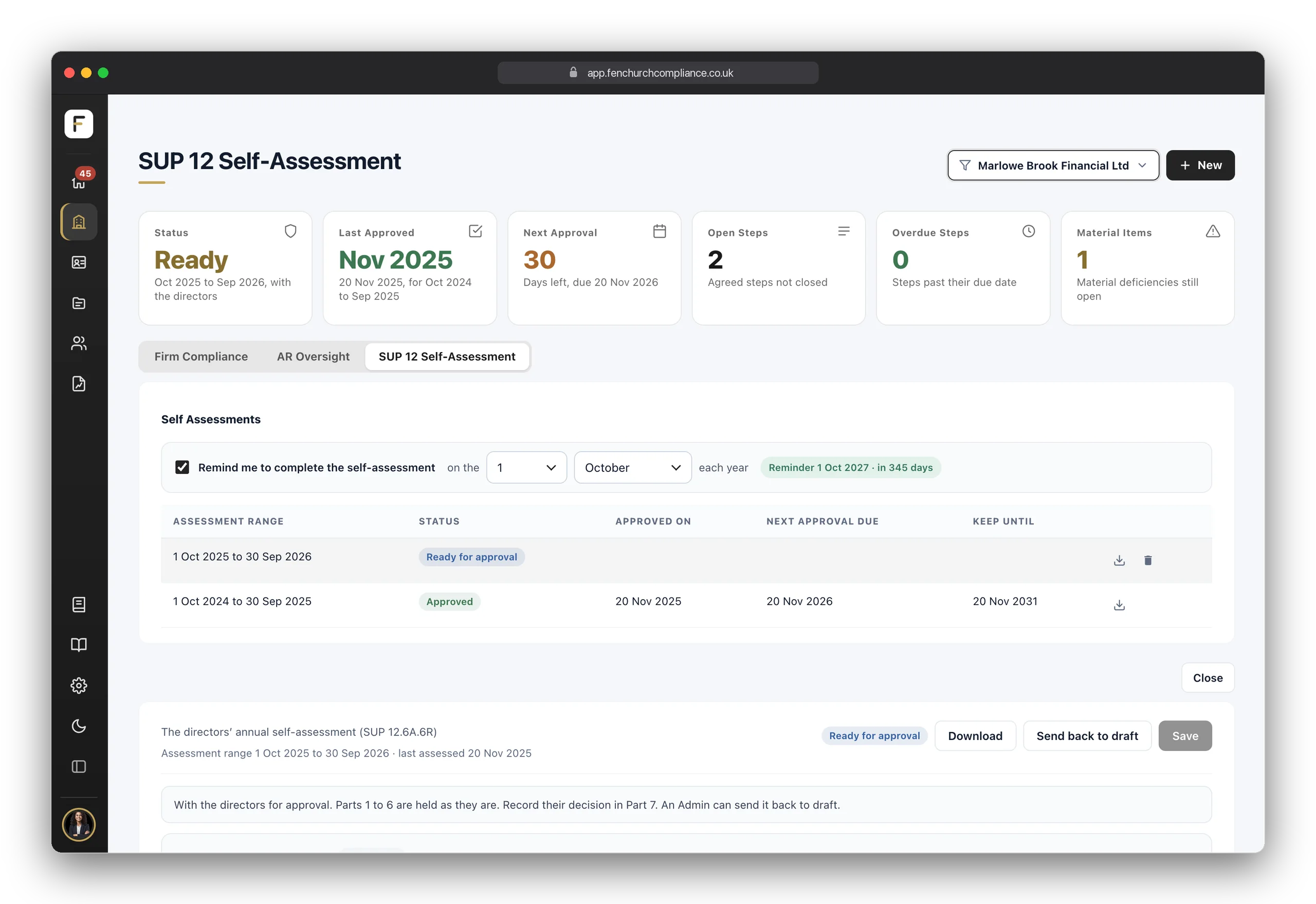
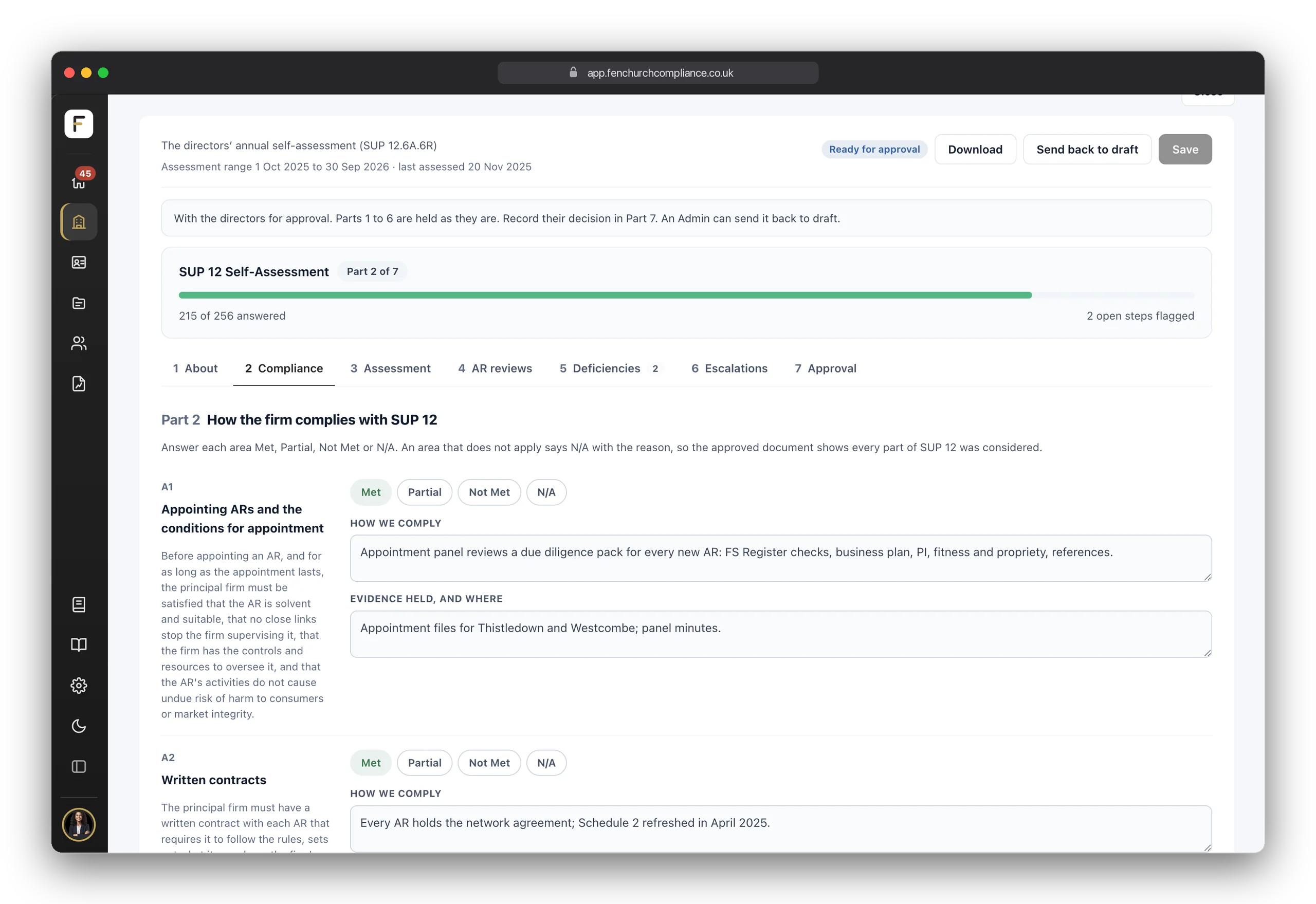
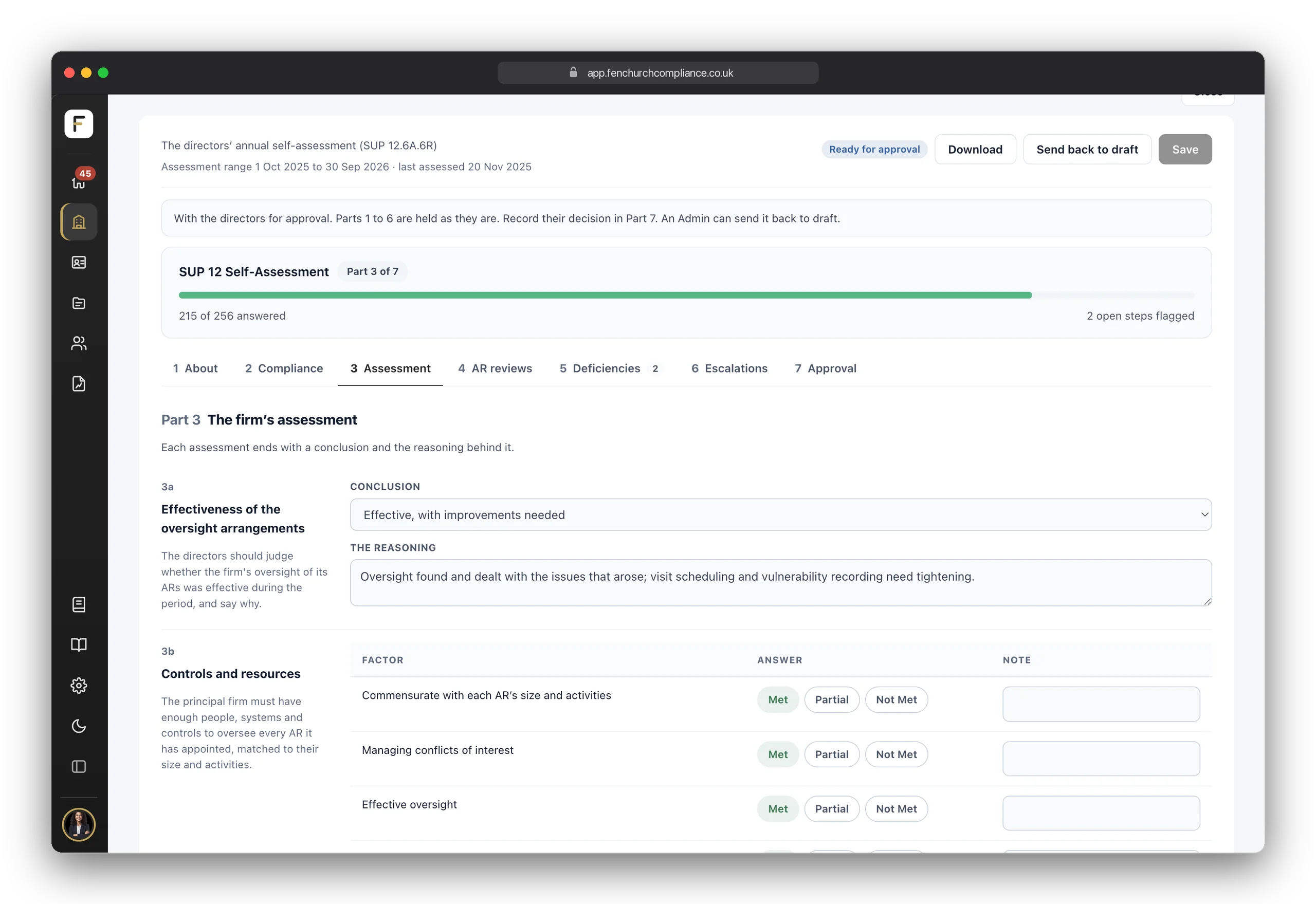
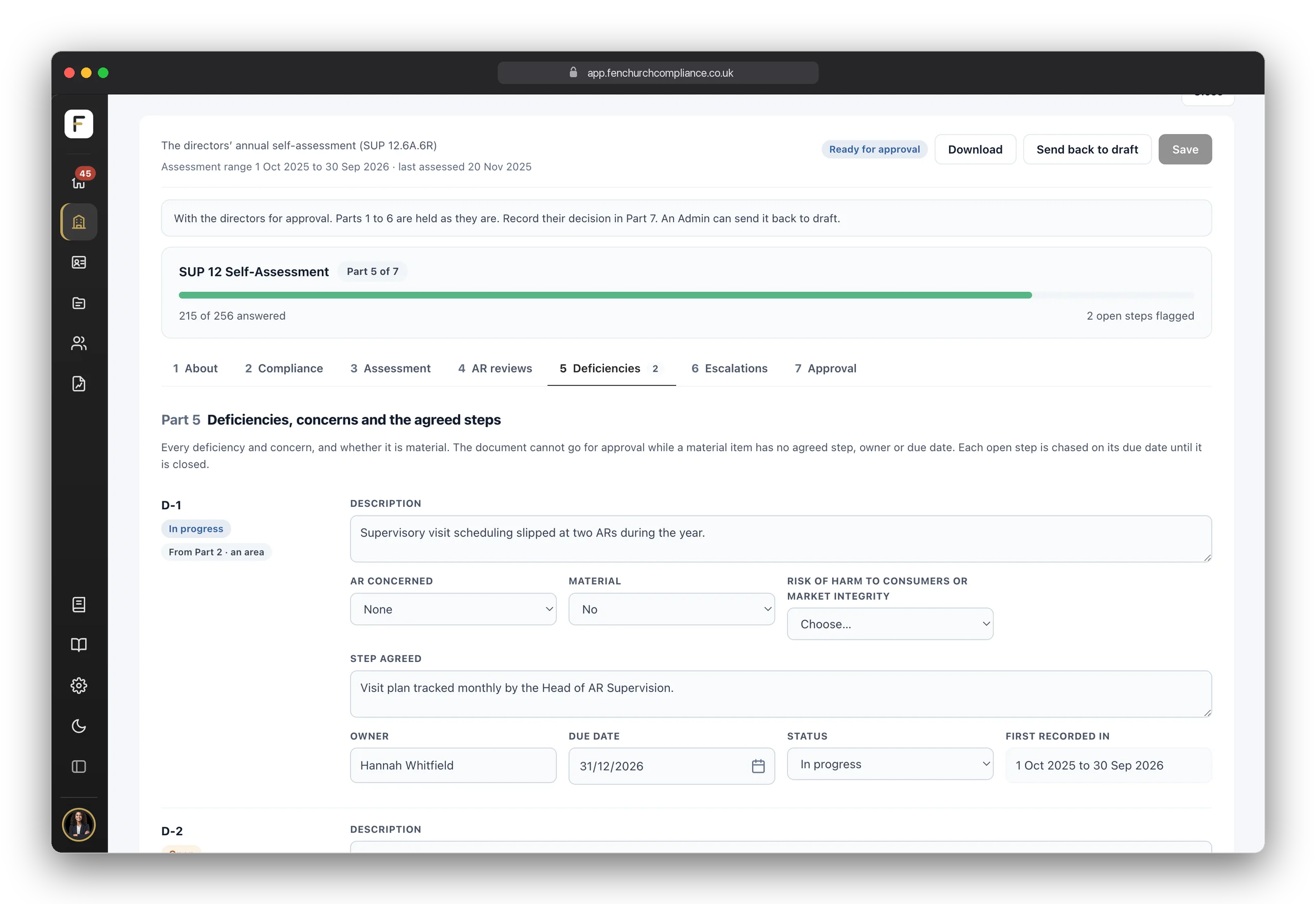
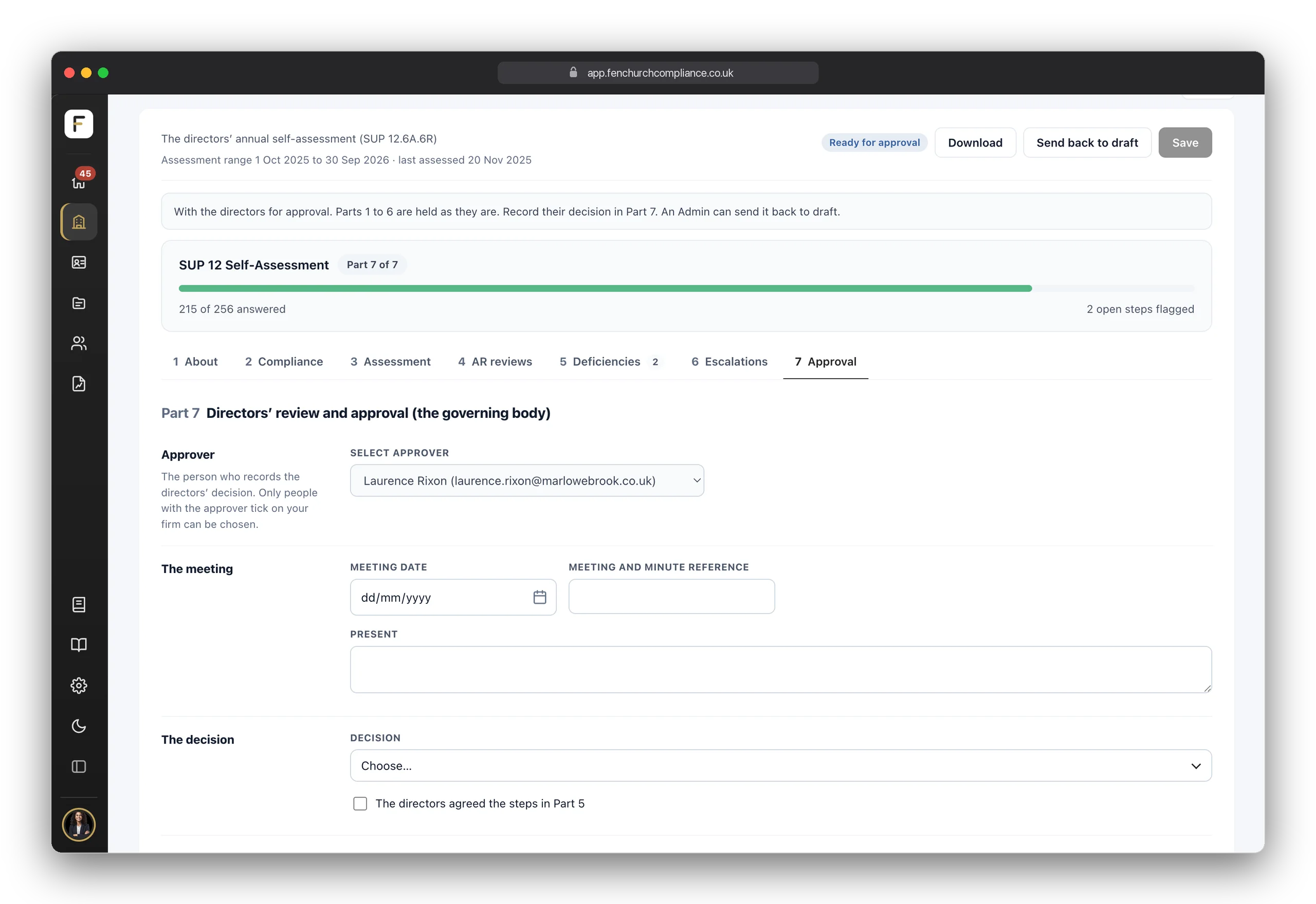
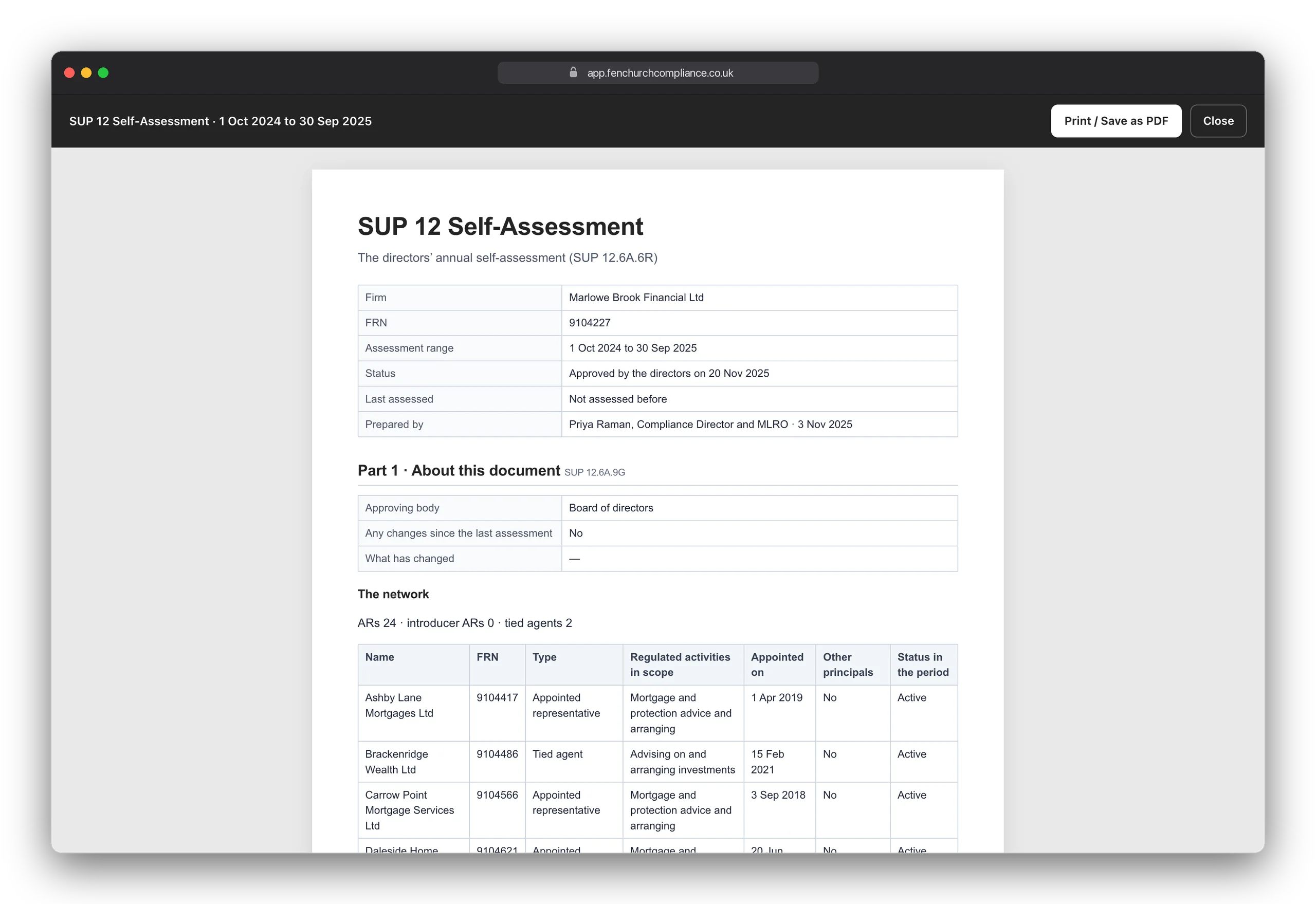
SUP 12.6A.6R asks every principal firm for a written self-assessment of how it complies with SUP 12, naming any material deficiencies and the steps agreed to fix them, reviewed and approved by its directors at least once every 12 months. Network gives you that document as a form in seven parts. Your AR oversight records fill much of it as you go, the agreed steps are chased until they are closed, and every approved version is kept for six years.
Inside Network
Network is not a switch that unlocks a couple of extra fields. It adds AR Oversight, the SUP 12 Self-Assessment and a report across your network, gives every AR's record a SUP 12 side for your oversight, and lets every page show one AR, several or all of them. Only principals see it. Here is what it adds.
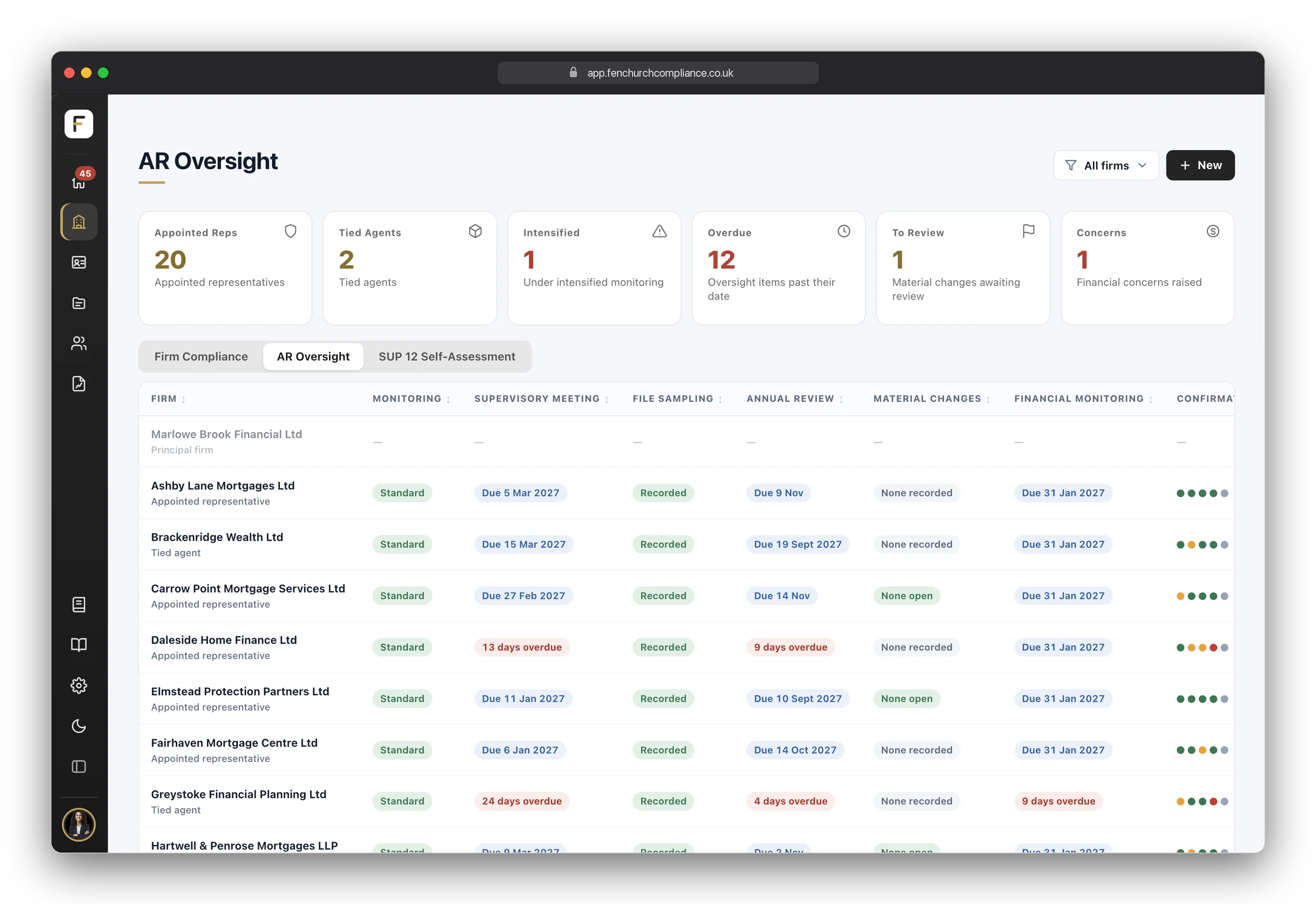
Every appointed representative and tied agent in one table, with a status for each oversight area: monitoring, supervisory meetings, file sampling, annual review, material changes, financial monitoring and Annual Confirmations. Click a row to open that AR's record.
Your annual self-assessment under SUP 12.6A.6R, filled from your oversight records, chased until its steps are closed and approved by your directors. How it works
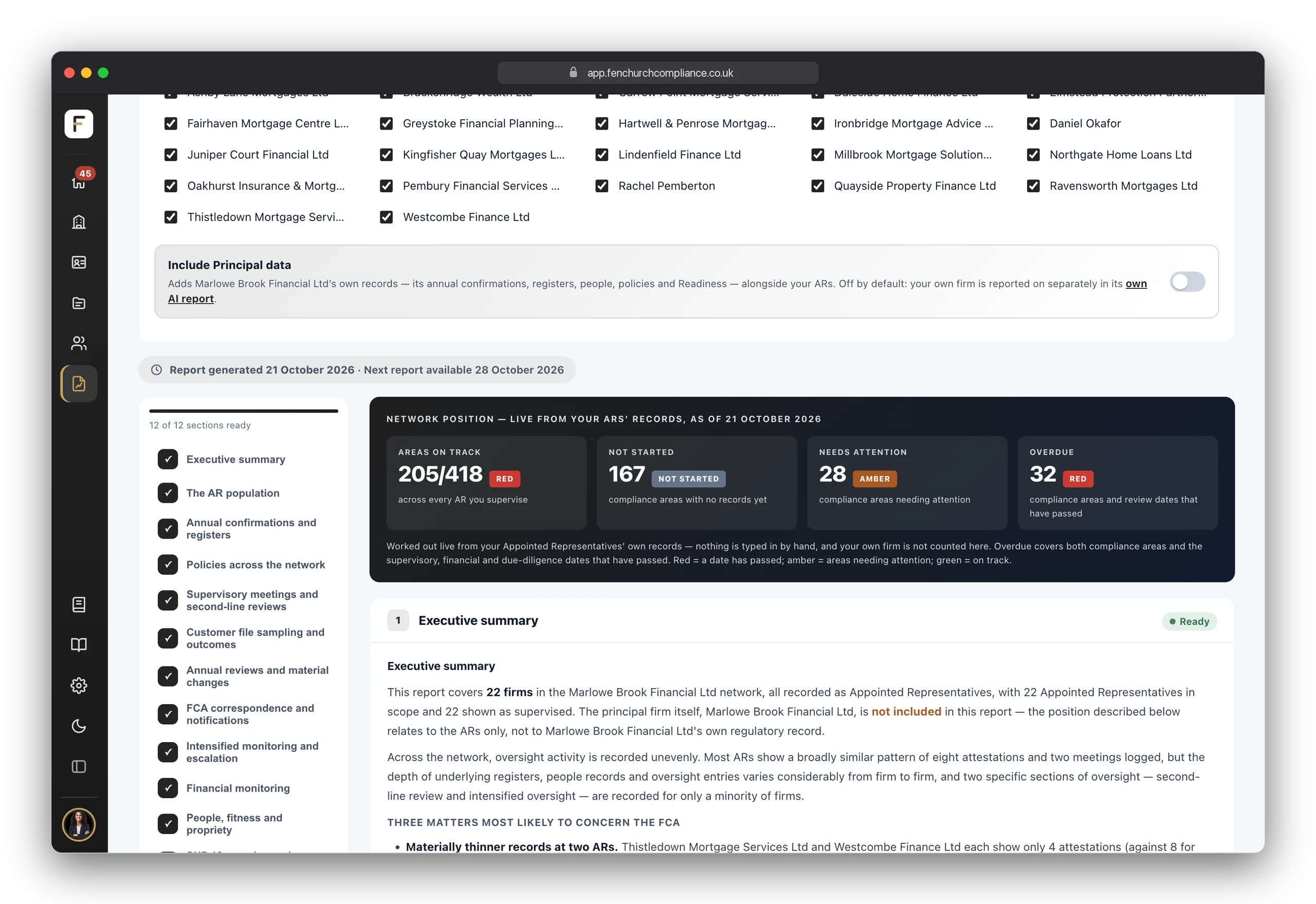
Twelve sections covering the whole network, cited against SUP 12. Tick which ARs it covers and whether to include your own firm, and the coverage is saved with the report so it always says what it looked at.
Choose one AR, several or all of them, and the page follows: the Control Centre, registers, Annual Confirmations, people and customers. Built for a network with dozens of firms in it.
When an AR goes onto heightened supervision: what changed, who owns it, by when, and how it was resolved or escalated.
Audits, meetings and visits: what you covered, what you found, how you rated it, who owns the follow-up and when the next one is due.
Financial promotions, customer outcome files, complaints handling, and training and competence, reviewed and recorded.
Pass, fail or edit on every file you sample, with the root cause and the remediation followed through to closure.
The formal yearly review of each AR, and the decision on whether the appointment continues.
What each AR tells you has changed, and whether that change needs notifying to the FCA.
Letters, emails, supervisory calls and skilled person engagements, kept against the AR they concern, with your response beside them.
Revenue, profit, capital adequacy and solvency for each AR, period by period, with a flag when something needs looking at. Evidence the firm is still viable to hold its appointment.
When an appointment ends: the decision, when it took effect, the reason, whether the FCA was told and on time, and the checks on customers, signed off.
Everything overdue, due in the next seven days or waiting on your approval, across your own firm and every AR, with the firm that needs most attention named first. One weekly email per person, not one per firm.
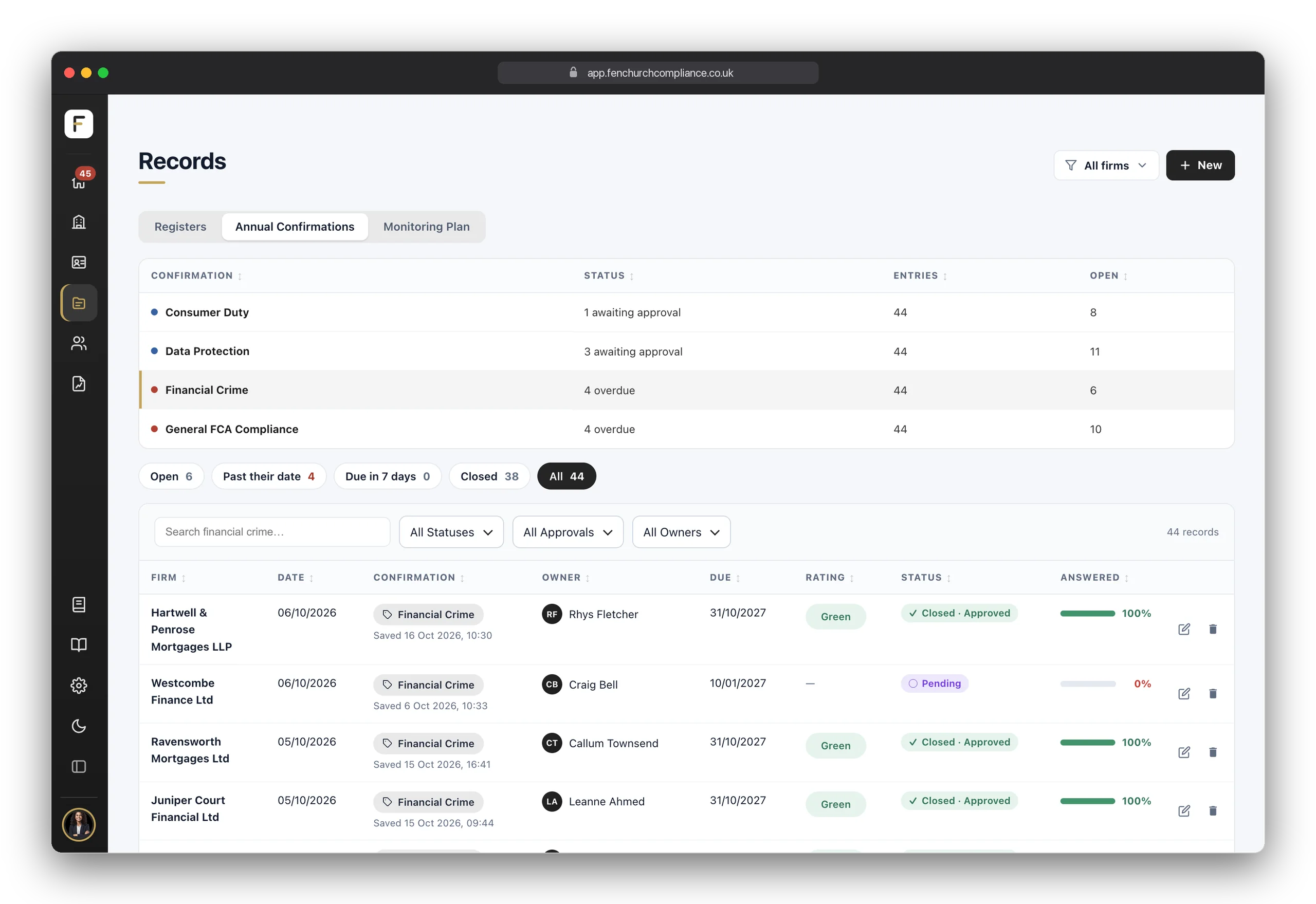
What every AR has confirmed, in one table with each one's rating, approval and how much is answered. Filter by firm and click straight through to the confirmation itself.
Complaints, breaches, conflicts and the rest, with how many entries each register holds and how many are open, for one AR, several or all of them.
Each AR's policies sit on its own record, with owner, version and review dates, and a review that has passed shows in red.
Every AR's regulated people: fitness and propriety and when it is next due, responsibilities, conduct, their due diligence, and who holds a login.
Customer files and counterparties at every AR: each customer's new business, complaints and due diligence, with its risk rating and when it is next due.
You record your own firm's permissions once. On an AR's record they become a list to tick from, and nothing else. Remove one from your own and any AR still naming it is flagged in red.
Upload your own policy templates once, in Settings, and choose which ARs receive them. Each AR finds them under Principal Templates on its Policies tab, and a new version reaches every AR already assigned.
A tab of your own firm's record: who leads if the FCA appoints a Skilled Person or a case reaches the Ombudsman, who to contact, and when you last rehearsed producing documents at short notice.
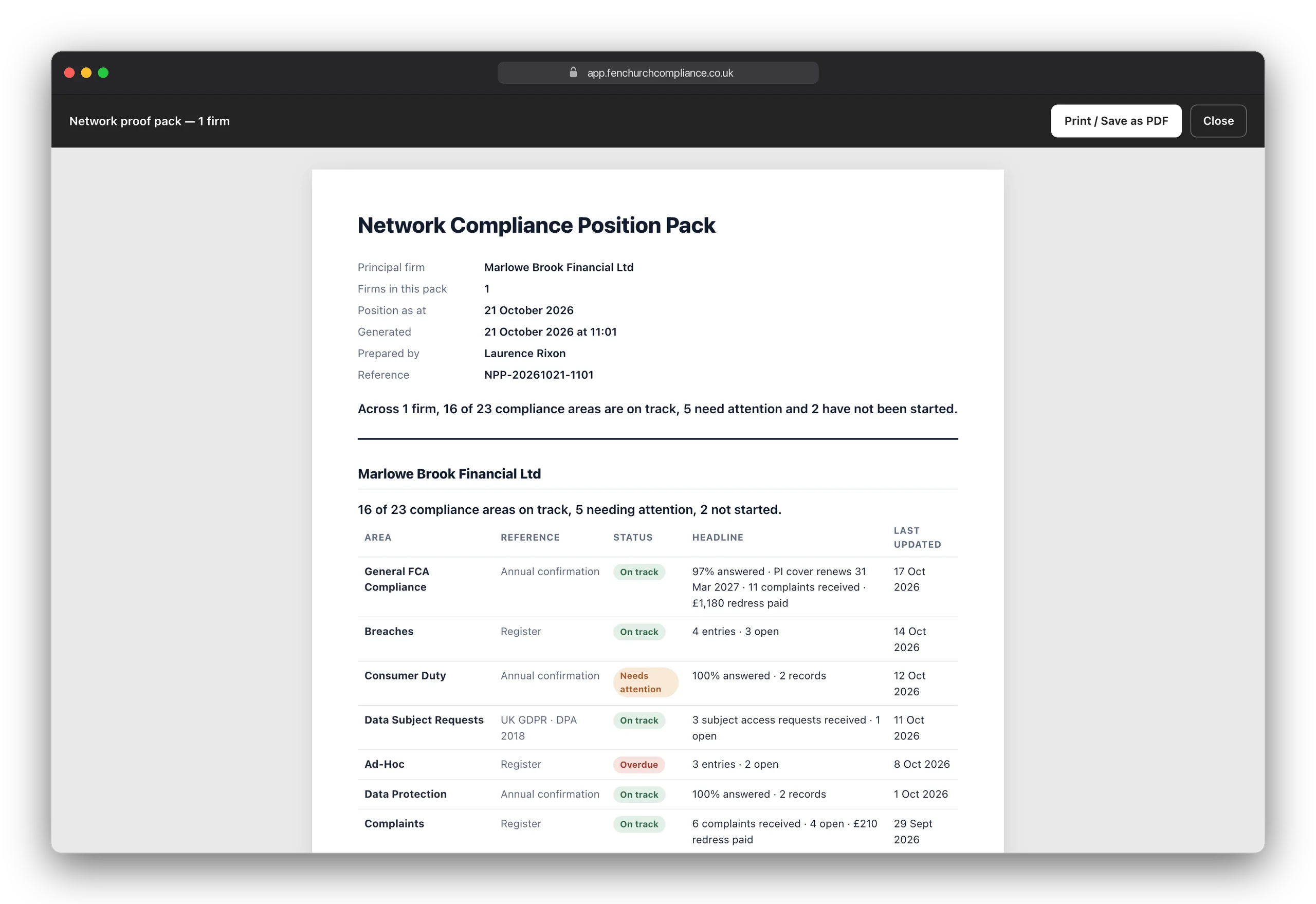
Tick the firms you want and get one dated document covering all of them, ready to hand to your directors or an auditor.
One download covering every firm you tick, plus your own oversight records about them, without going into each AR in turn.
A single read-only address covering every firm you tick, so a reviewer gets one link rather than one per firm. Passcode and expiry optional, and you can revoke it.
See it in action
The Control Centre, AR Oversight, each AR's oversight record and the SUP 12 Self-Assessment, then the screens every AR works in. Click any screen to take a closer look.
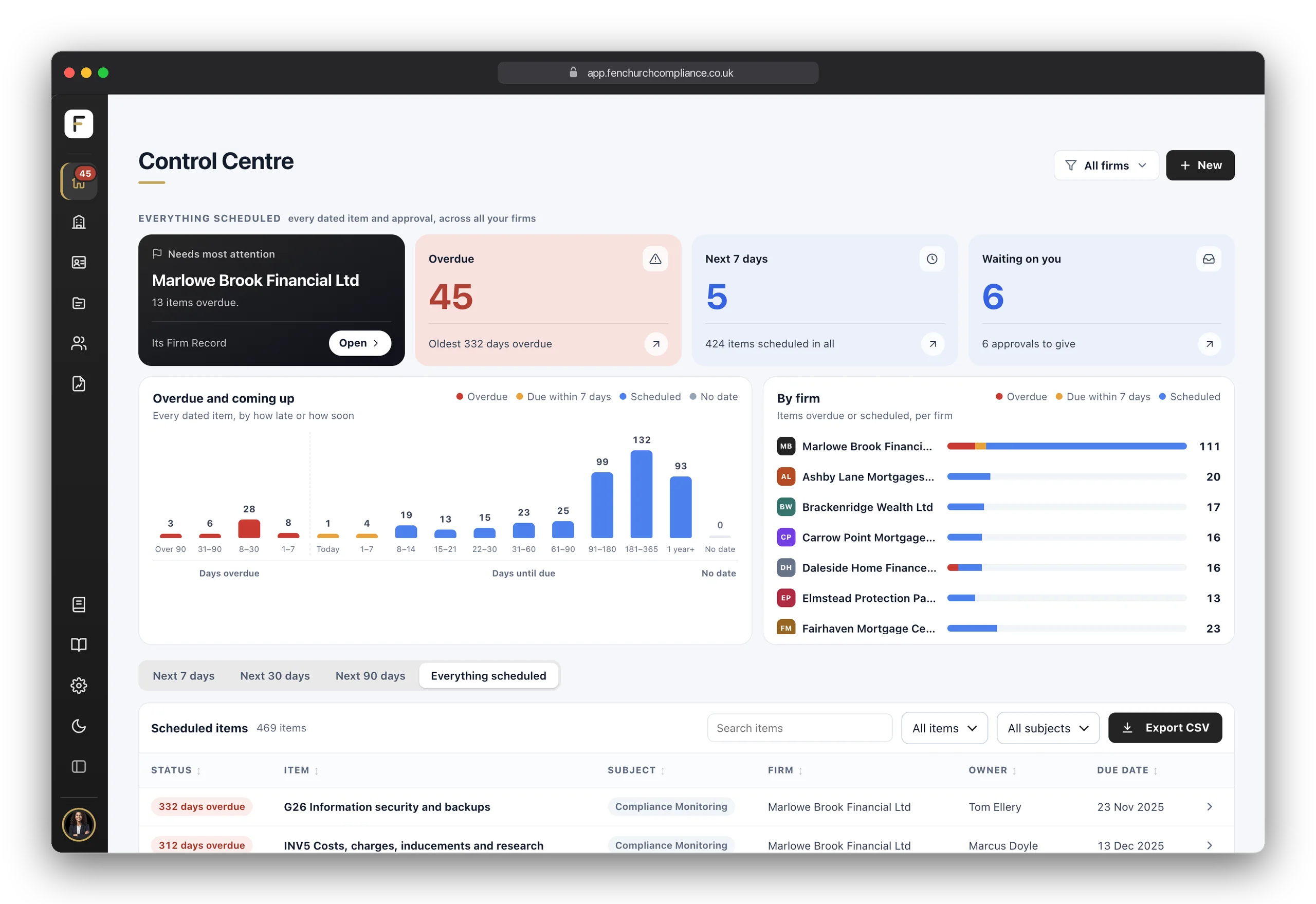
Everything scheduled across your own firm and every AR: what is overdue, what is due in the next seven days and what is waiting on your approval, with the firm that needs most attention named first.
Every appointed representative and tied agent in one table, with a status for each oversight area: monitoring, supervisory meetings, file sampling, annual review, material changes, financial monitoring and Annual Confirmations.
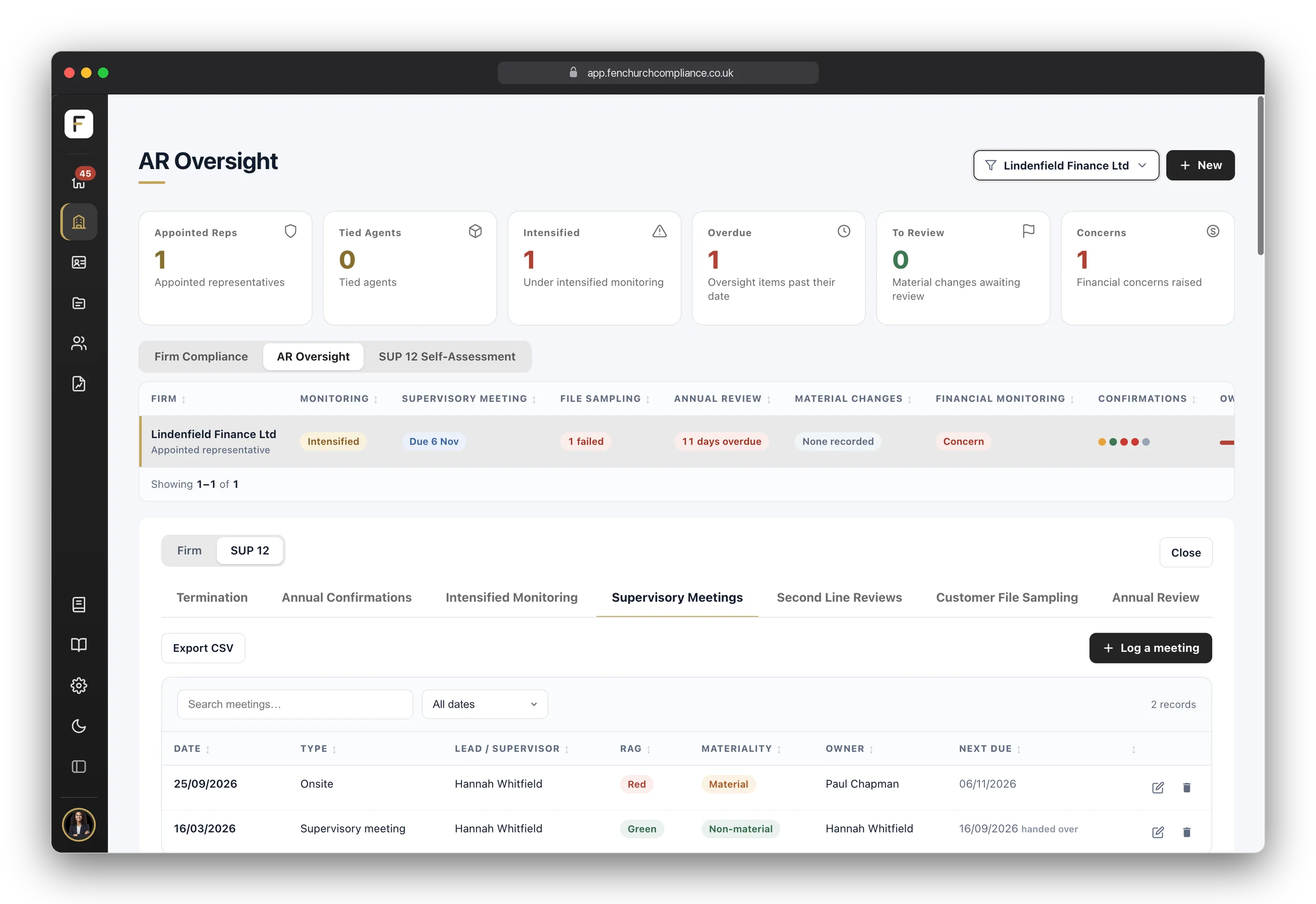
Click an AR and switch its record to the SUP 12 side: termination, Annual Confirmations, intensified monitoring, supervisory meetings, second line reviews, customer file sampling, annual review, material changes, FCA correspondence and financial monitoring, all kept against that AR.
Your annual SUP 12 self-assessment: its status, when it was last approved and when the next approval falls, the open and overdue steps, and a reminder on the day you choose each year.
Part 2 of the self-assessment: how your firm complies with SUP 12, area by area, answered Met, Partial, Not Met or N/A, with how you comply and the evidence you hold.
The four Annual Confirmations, Consumer Duty, Data Protection, Financial Crime and General FCA Compliance, with every firm's entries, each one's rating, approval and how much is answered.
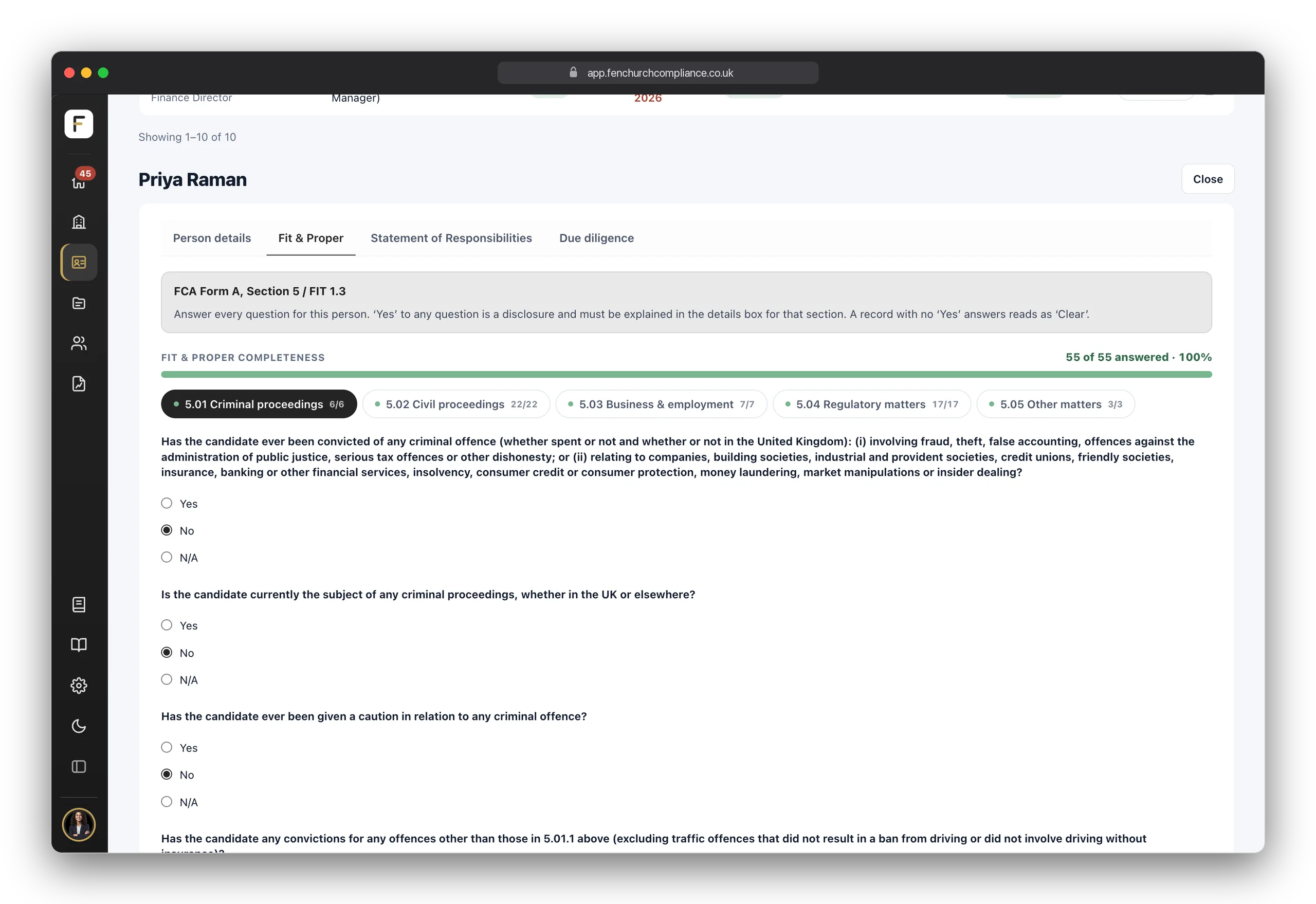
The full Fit & Proper assessment for each person, at your firm and at every AR: every FCA Form A question, answered and dated, with a completeness bar so you can see at a glance what's still open.
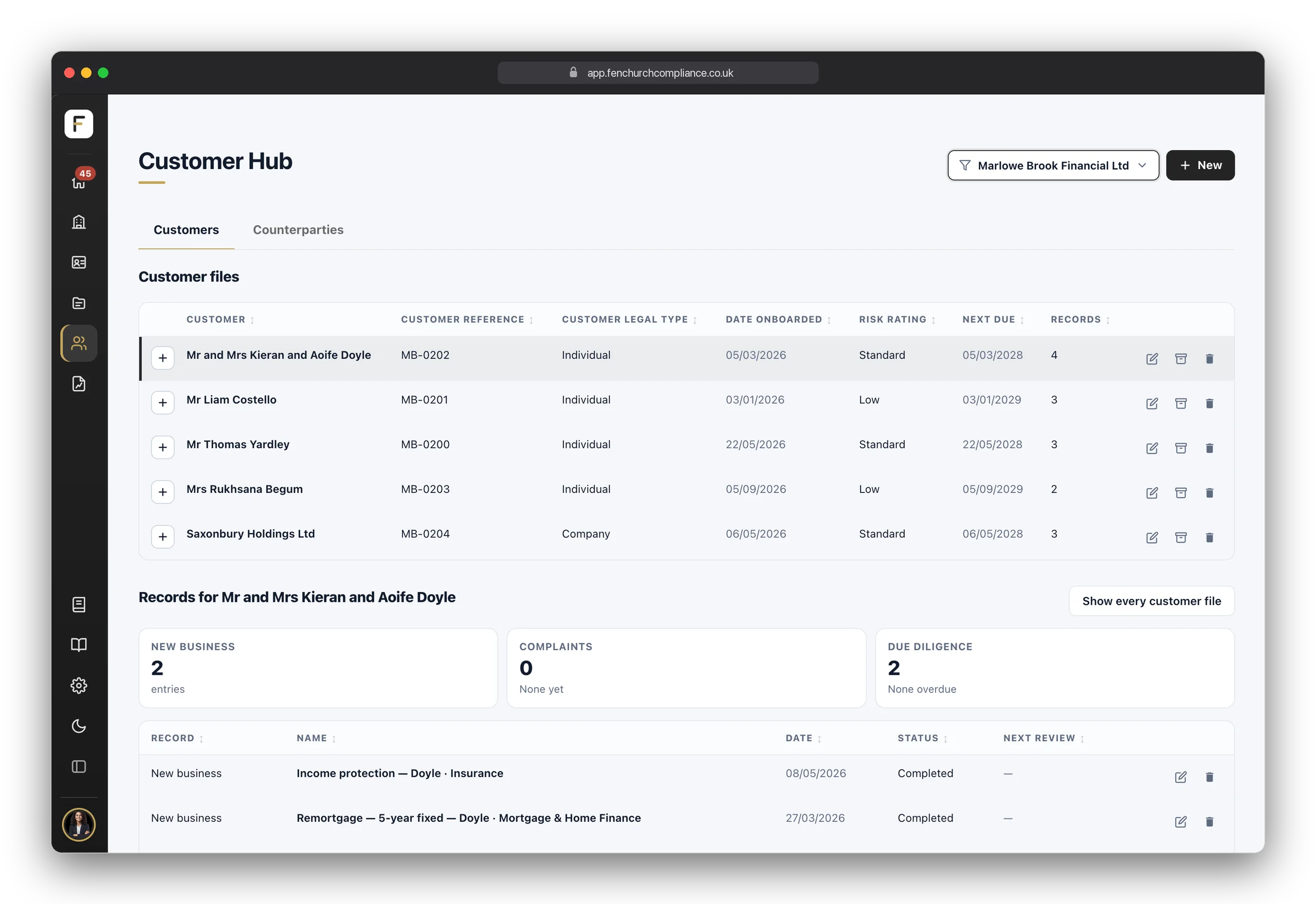
The Customer Hub: each customer's file, with its new business, complaints and due diligence below it, and your counterparties on a tab of their own.
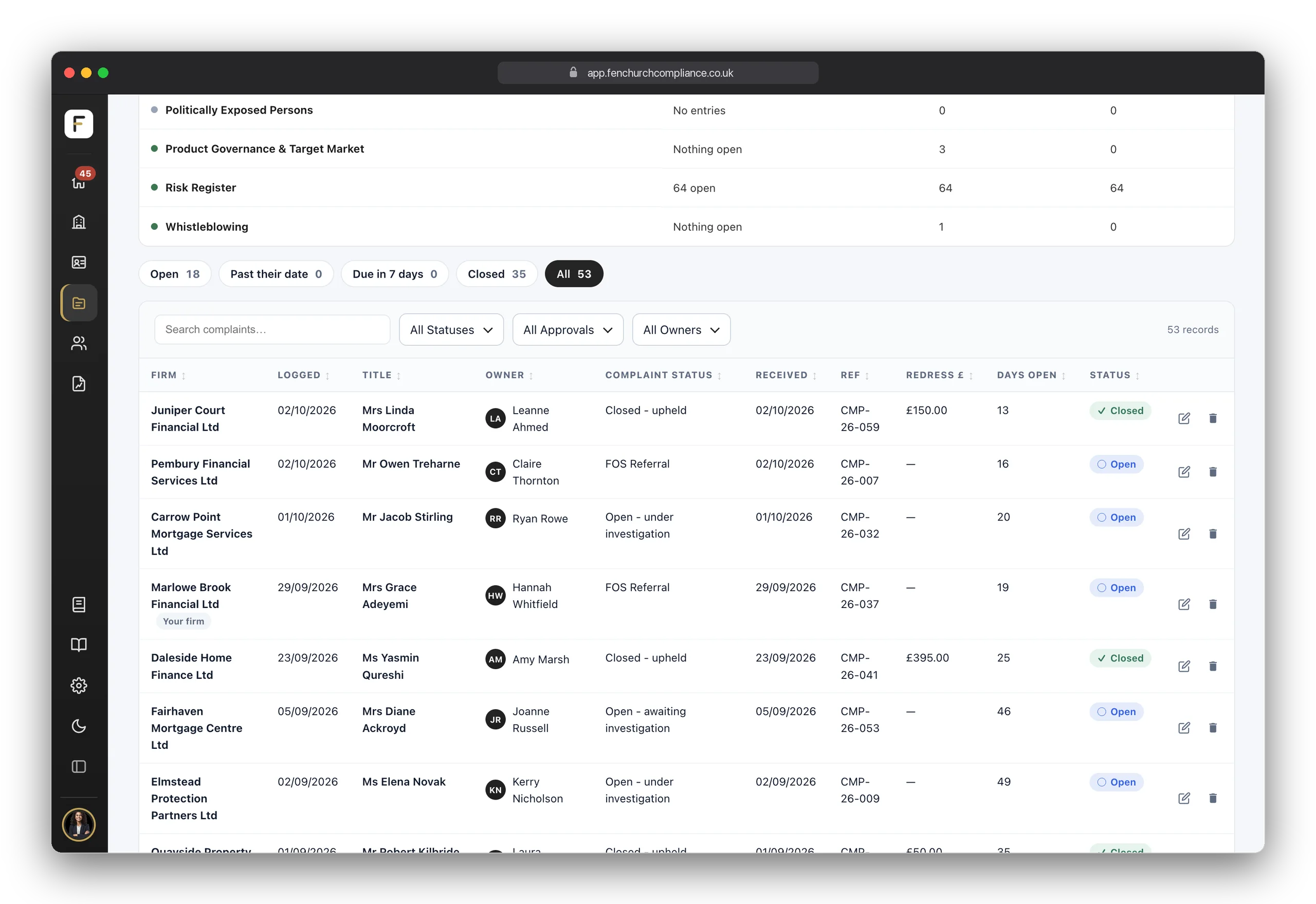
The registers the FCA expects you to hold, here the Complaints register, ready to add to the moment something happens.
One report across the network for your directors, in twelve sections cited against SUP 12. Tick the ARs it covers, and include your own firm if you choose.
One click builds a branded, dated evidence pack: your position, your open items and the records behind them, for one firm or every firm you tick, ready for your directors, your auditor or an FCA request.
Tap the tabs to explore each area, and tap any screen to enlarge — then pinch or double-tap to zoom in close.
How it works
No implementation project. No onboarding call you have to book. Your first AR could be up and running before lunch.
Due diligence and assessments live in one place. Answer the plain-English questions, attach a document, sign it off. That's the evidence — dated and kept.
Breaches, whistleblowing, data-subject requests, conflicts of interest — the registers the regulator expects to be held, ready to add to the moment something happens.
One click turns everything recorded into a clear report, mapped to the rules — ready for your directors, an auditor, or an FCA request. Written in English, not handbook. Network includes every report type — the exec summary, the full compliance report and the FCA dry run.
Up and running
No implementation project and no onboarding call to book. Set up your firm from its FRN, with your appointed representatives and tied agents read from the FCA's register too, and plain-English tutorials sit on every screen, so you're never stuck.
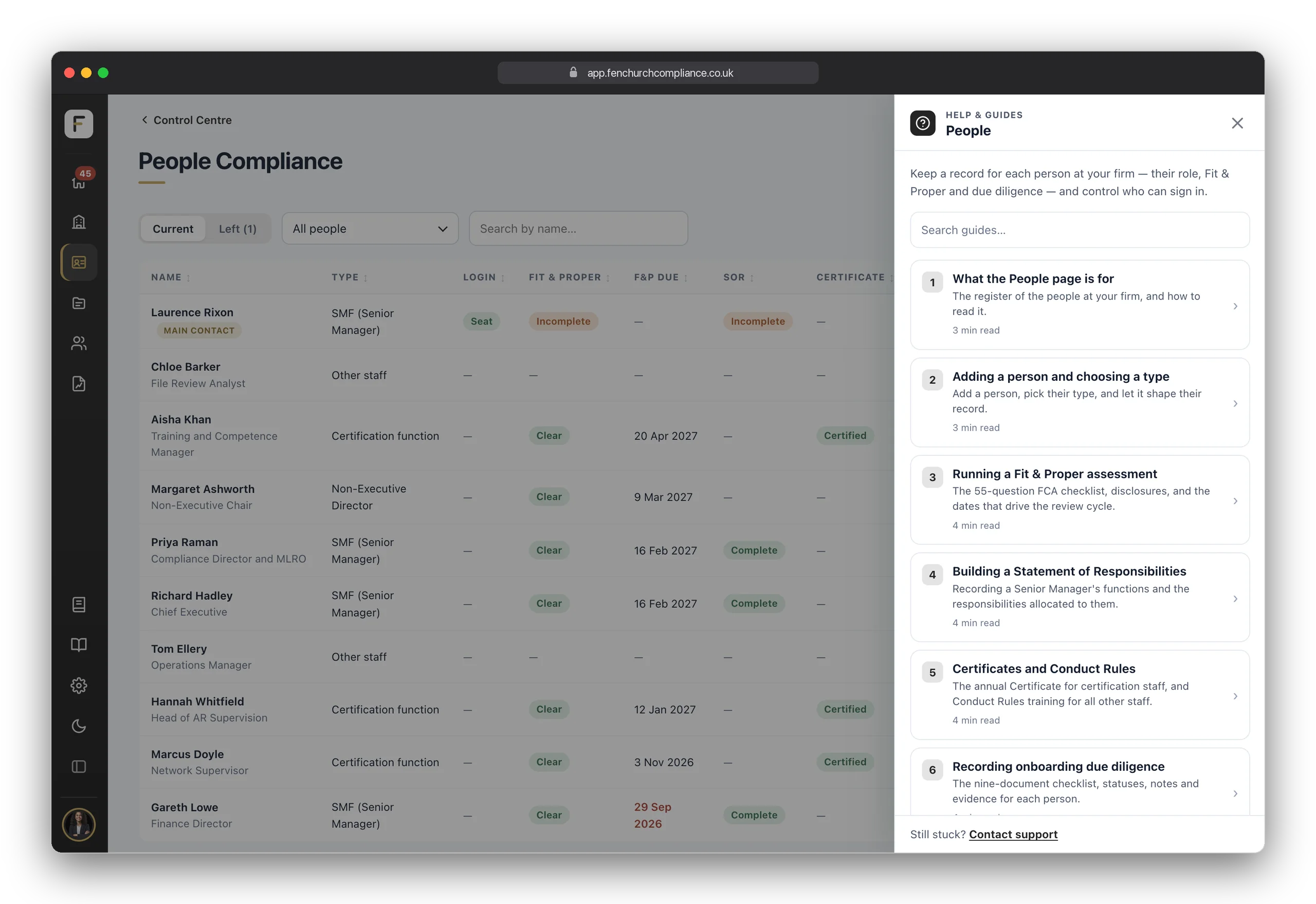
The first time you sign in, type your firm reference number. Your firm's details and permissions are read from the FCA's register, with the appointed representatives and tied agents it lists. Tick the ones that are correct and each is set up as a firm of its own, ready for its records. You can open it again from Guidance at any time.
Always-on helpWherever you are, a tutorials drawer is one click away: short, plain-English guides for that exact screen. No manual to read and no jargon to decode.
The report
Everything recorded across your network, read back in twelve plain sections — from the AR population and their confirmations to file sampling, financial monitoring and a forward plan mapped to SUP 12, with the gaps called out. No invented figures, no filler. Network also includes the eight-section report for your own firm's directors, the executive summary and the FCA dry run.
The whole job
The full platform is on every plan — only the extras carry a badge.
General FCA, Consumer Duty, financial-crime and data-protection confirmations that teach as they record.
Complaints, conflicts, breaches, gifts and more — dated, owned, evidenced.
Recurring compliance checks for your own firm, from a built-in library of 80, each with an owner and a due date.
Everything scheduled across your firm and every AR: what is overdue, what is due soon and what is waiting on your approval.
RegData deadlines tracked, with templates for the most common returns.
Customer and counterparty due diligence in one place, linked to new business and complaints.
From full report to mock FCA interview — drawn only from your records.
A dated, referenced export for auditors, executive meetings or the regulator.
Share evidence read-only by link, with optional passcode and expiry — revoke any time.
SM&CR, APER, IDD and conduct rules — unlimited people records on every plan.
Your own firm, plus one for every appointed representative and tied agent you supervise, however many you appoint.
Users see only the firms they have been given access to, and an AR never sees another AR's.
New AR, new branch, new entity — live in moments, no support ticket.
Your own policy uploads, plus expert policy templates, and the full register and general template library. All included on Network.
Choose the registers and confirmations each firm keeps, or build a form of your own, in Settings. Included on Network.
Your logo and colours across the platform, reports and Live Links.
Enter your FRN and your firm's details, permissions, appointed representatives and tied agents are read from the FCA's register.
A built-in help library for ongoing support, in plain English.
A weekly email digest — deadlines chase you, not the other way round.
No lock-in
Minutes to set it up, and a monthly plan with nothing to sign and nothing to give notice on.
Network is £750 a month including 3 Appointed Representatives, then £50 per AR per month. Contact us and we will take you through it.
Enter your FRN and your firm, its appointed representatives and its tied agents are read from the FCA's register, then a short guide points you at what to do first. No implementation project, no call to book.
Plain-English tutorials sit on every screen, and a real person answers when you'd rather just ask.
One monthly price for your whole network. No setup fee, no minimum term, cancel any time.
From your billing portal, in a couple of clicks. No notice period, no exit call — and your records export with you.
Network questions
Book a demo
Pick a time that suits you. Forty-five minutes on Zoom, and we'll set up a network the way you'd run it — your registers, your Annual Confirmations, your reports, and the portal your ARs would use.
We've emailed you a confirmation with your Zoom link and a calendar invite. If you don't see it in a few minutes, check your junk folder.
Long enough to see the whole thing working, short enough to fit in a normal week.
We work in the live product against a network shaped like yours, and you drive as much of it as you want.
A demo commits you to nothing — it just saves you working it out alone.
Set up your principal firm and your first AR today — add the rest whenever you appoint them.
One email a month: straightforward FCA guidance, product updates and the dates worth knowing. No noise.
We use essential cookies to make the site work, and optional advertising cookies to measure how well our ads perform. See our Cookie Policy.